Custom panels, built around your event
We build a custom admin system around your own forms, fees and process, and change it however you need. The live demo runs a vendor fair: applications, approvals, branded PDF invoices, MMG and bank-transfer tracking, and WhatsApp follow-ups.
- No build fee, US$40/mo
- Branded PDF invoices
- MMG and bank transfer tracking
- One-tap WhatsApp
- CSV and PDF export
Demo login demo / carbonware2026. Sample data, resets every hour.
Used by the Essequibo Chamber of Commerce & Industry for their event.
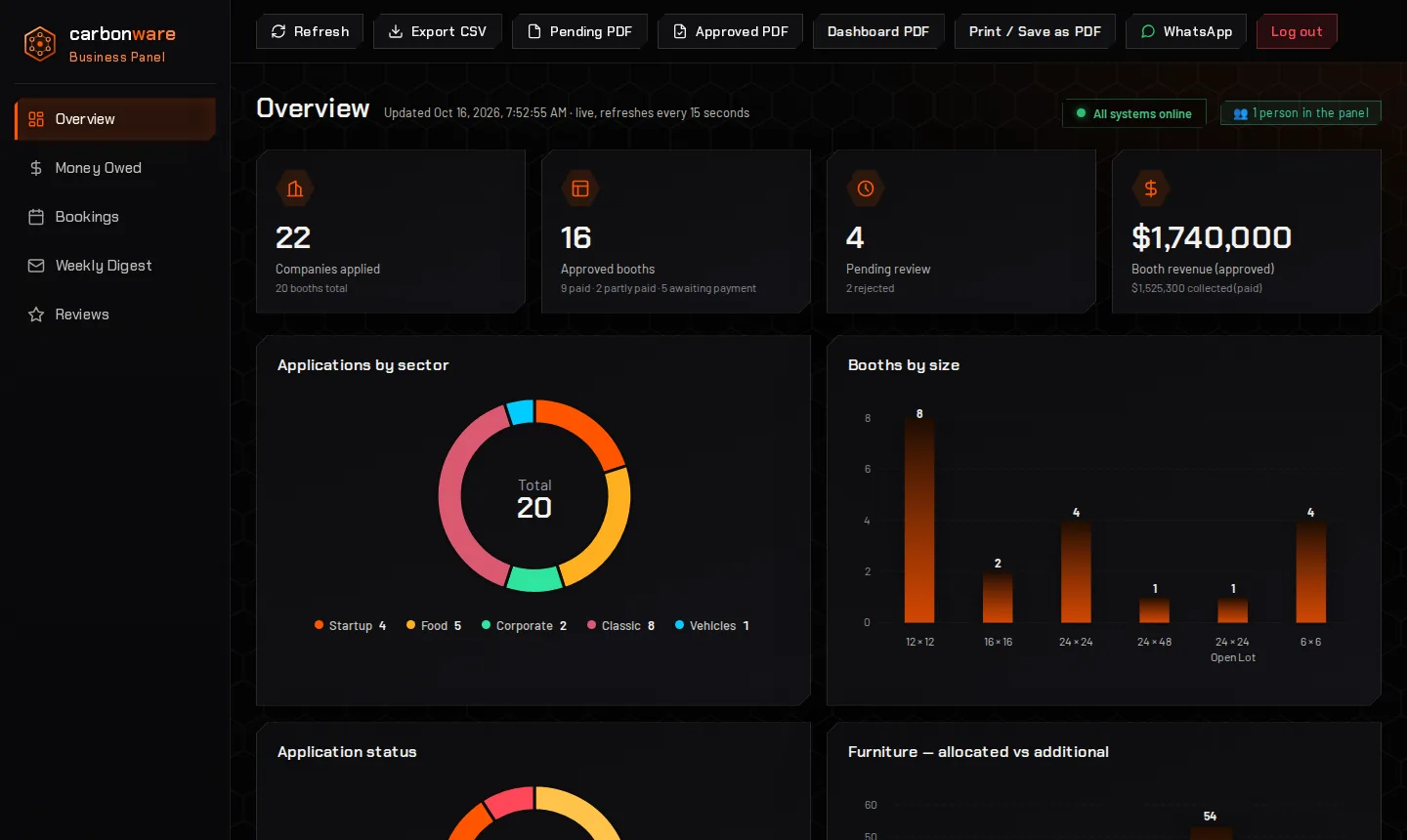
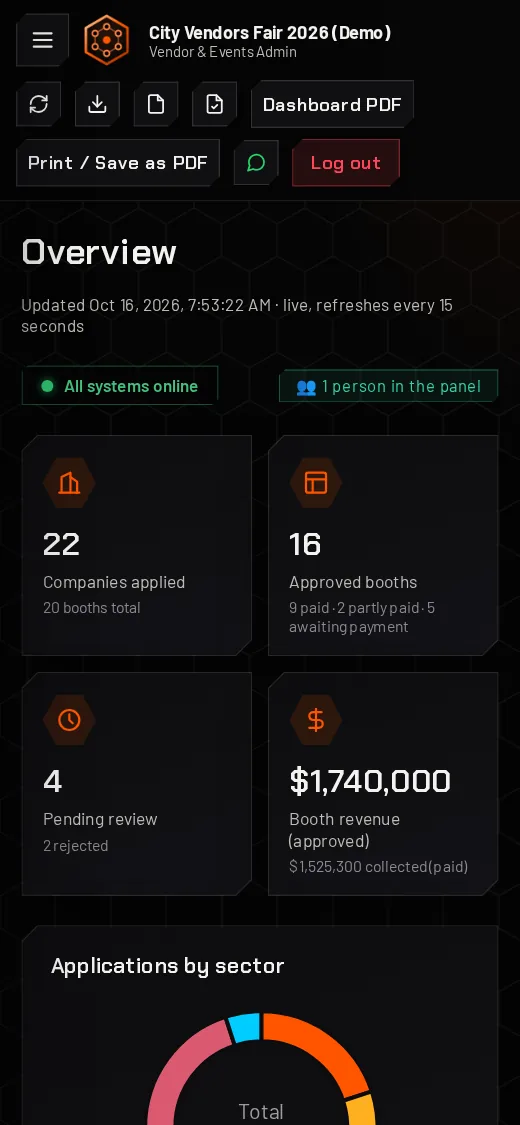
Screenshots of the live demo on desktop and phone. Every name and figure is fictional.
From scattered to one place
If applications, invoices and bookings live in chat threads, paper and spreadsheets, the panel puts the same work in one system your whole team can see.
How it often runs today
- Applications arrive by WhatsApp, email and paper
- Payments tracked in a spreadsheet
- Invoices typed up by hand
- Reminders sent when someone remembers
With the panel
- Every application in one searchable list
- A branded PDF invoice in a click
- Unpaid invoices with a WhatsApp nudge button
- Booking reminders out in one tap
What you can run from the panel
One login, five views and a full file for every customer. Each screen below is from the live demo, and the full list of functions follows the tour.
See the whole business at a glance
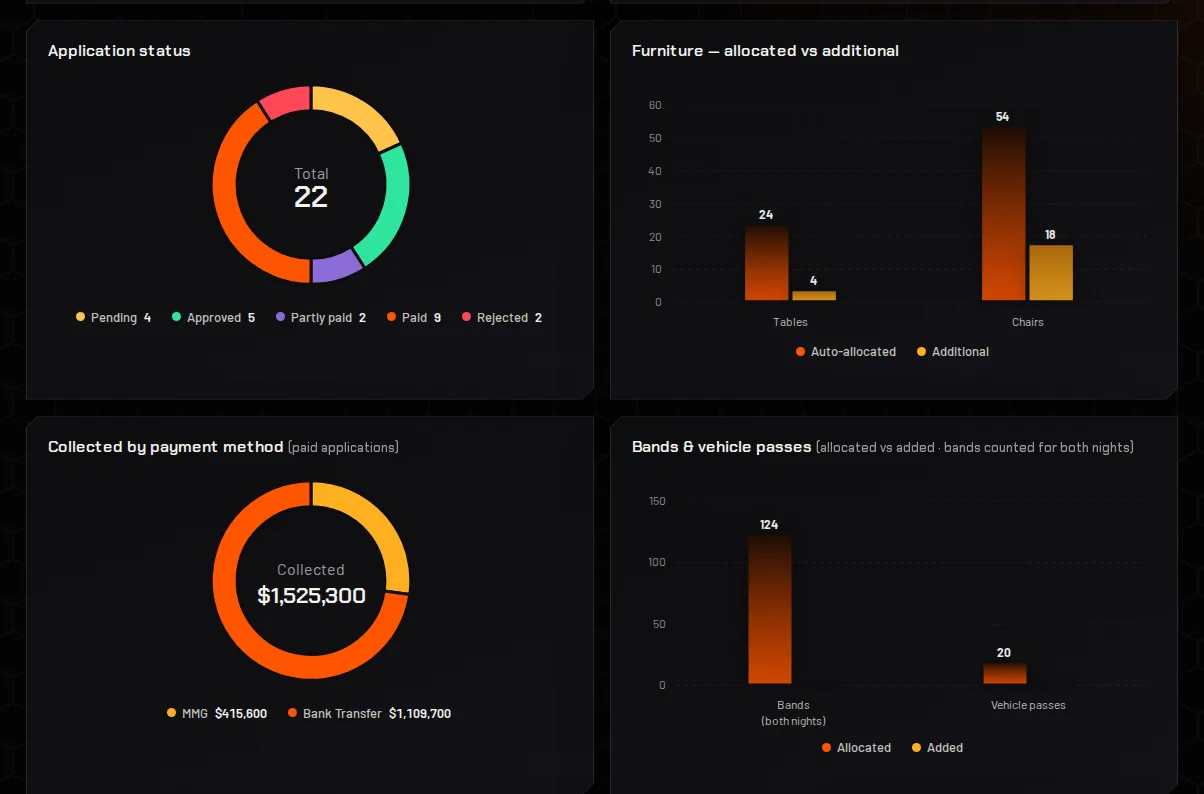
The overview shows where every application, invoice and payment stands, and the figures update live, checking for changes every 15 seconds.
- Live totals for applications, approvals, pending reviews and revenue.
- Charts by sector, size, status and payment method.
- Export to CSV or PDF, or print a dashboard page, in one click.
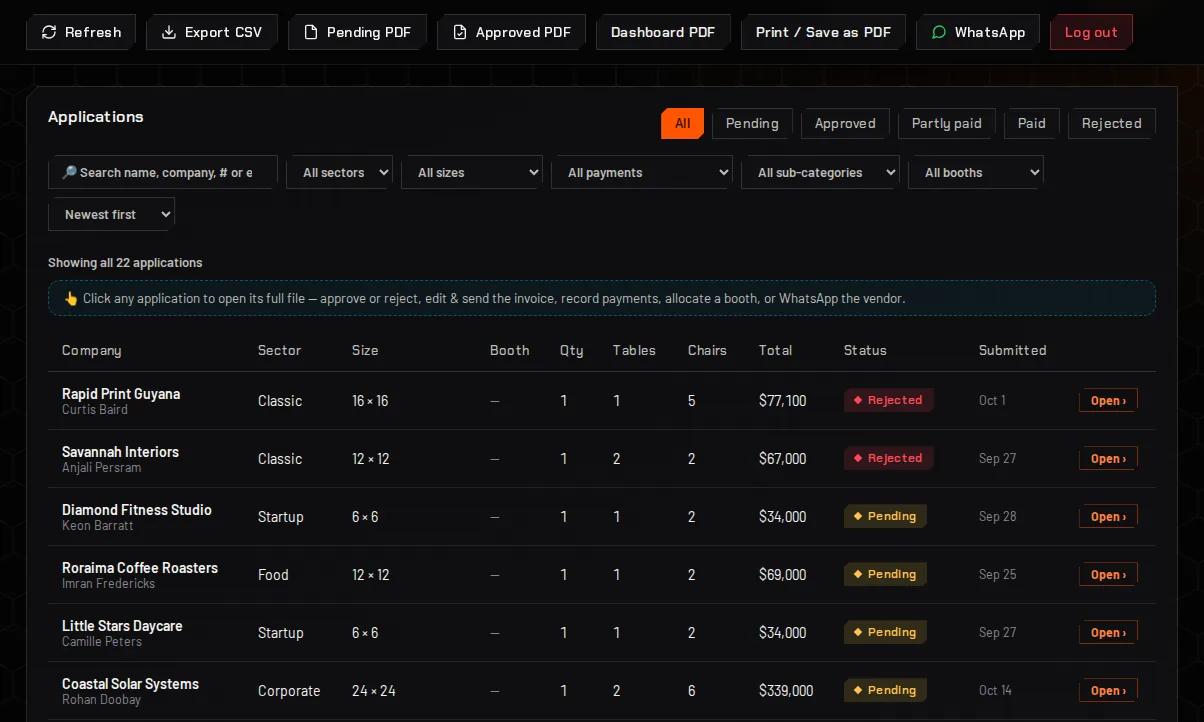
Every application in one searchable list
People apply through a public form and land in the list with a status, so nothing lives in a chat thread.
- Search and filter by name, sector, size, payment status and more.
- Status at a glance: pending, approved, partly paid, paid or rejected.
- Click any row to open the full file.
Approve, invoice and follow up without leaving the record
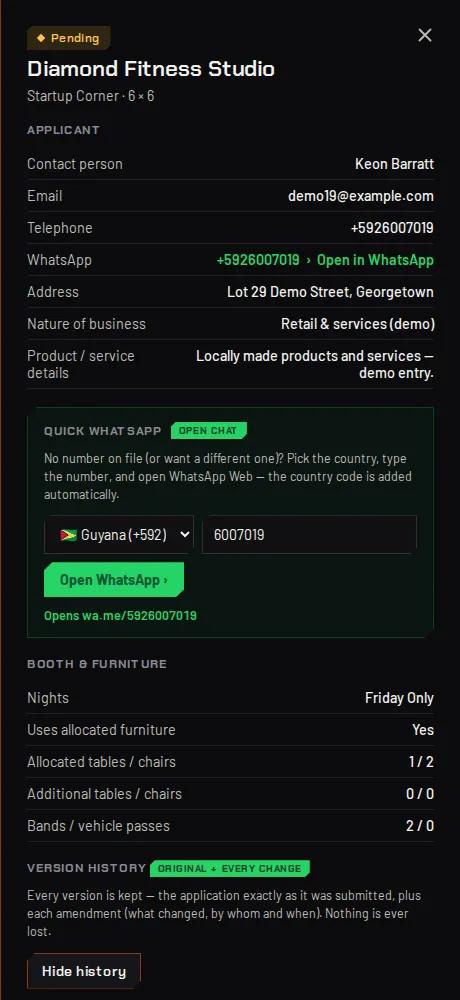
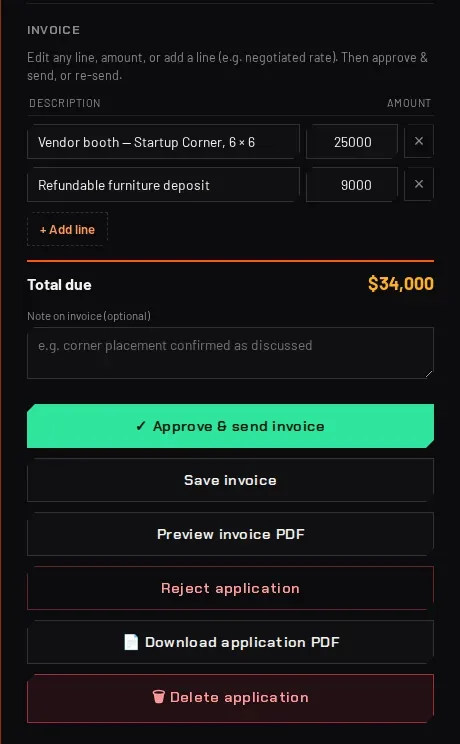
Open an application and everything about that customer is in one place.
- Edit the invoice line by line, then approve and send it, or preview the PDF first.
- Version history keeps the application as it was submitted plus every change, with who made it and when.
- WhatsApp opens a chat with the country code already filled in.
- Proof of payment photos are stored with the record.
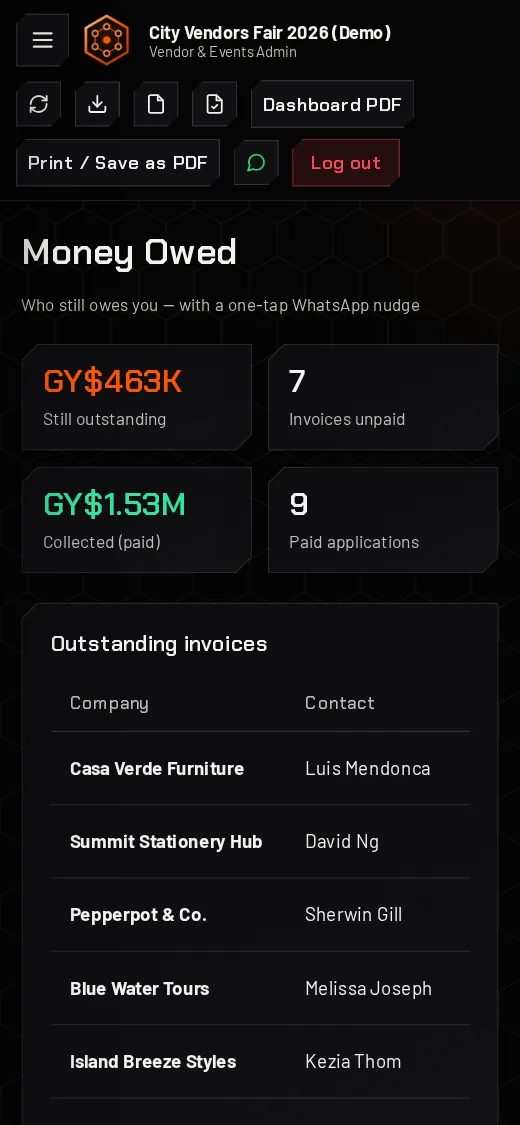
Know who still owes you
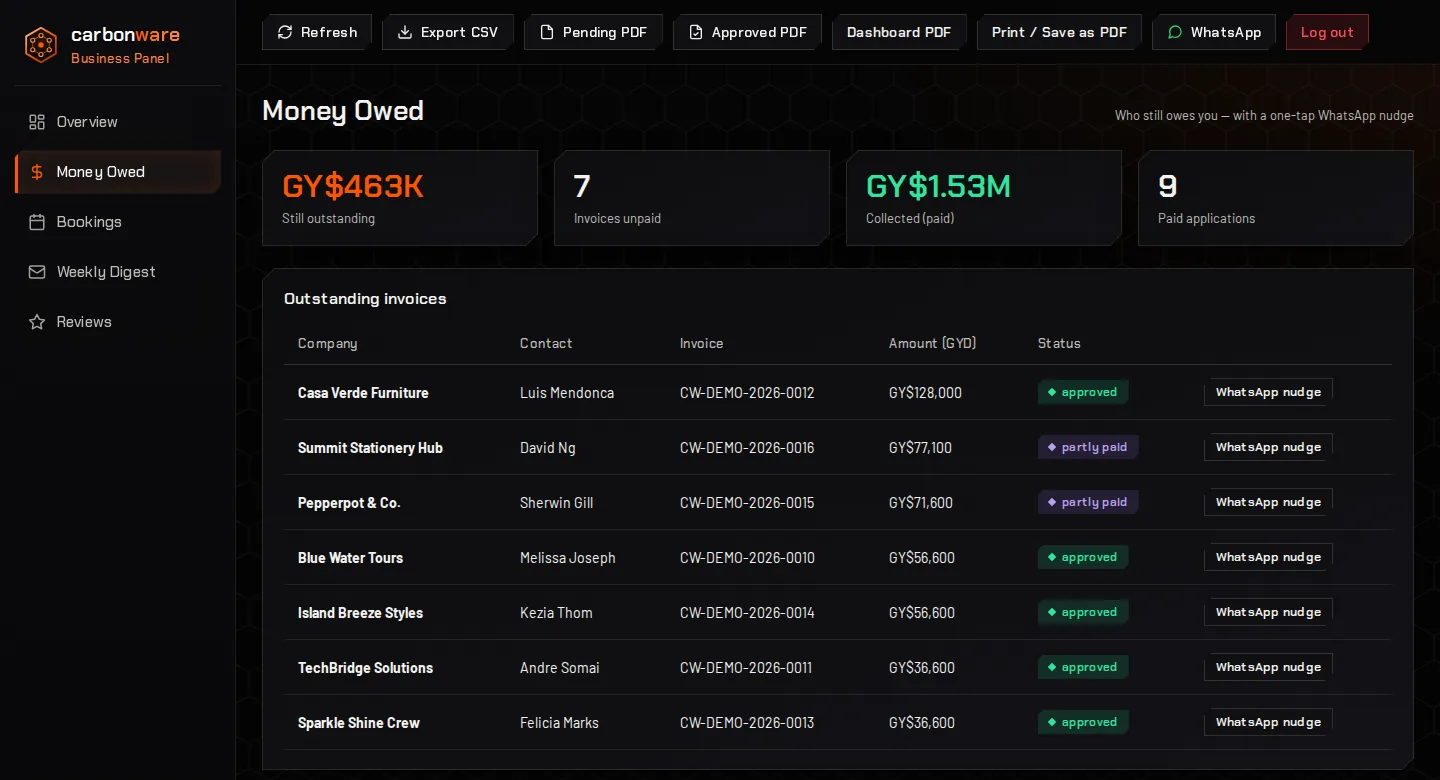
A single list of unpaid invoices, with the amount, the invoice number and a nudge button for each one.
- Outstanding balance with unpaid invoices and amounts collected, in Guyana dollars.
- One-tap WhatsApp nudge for every customer who still owes.
- MMG and bank transfer payments tracked separately.
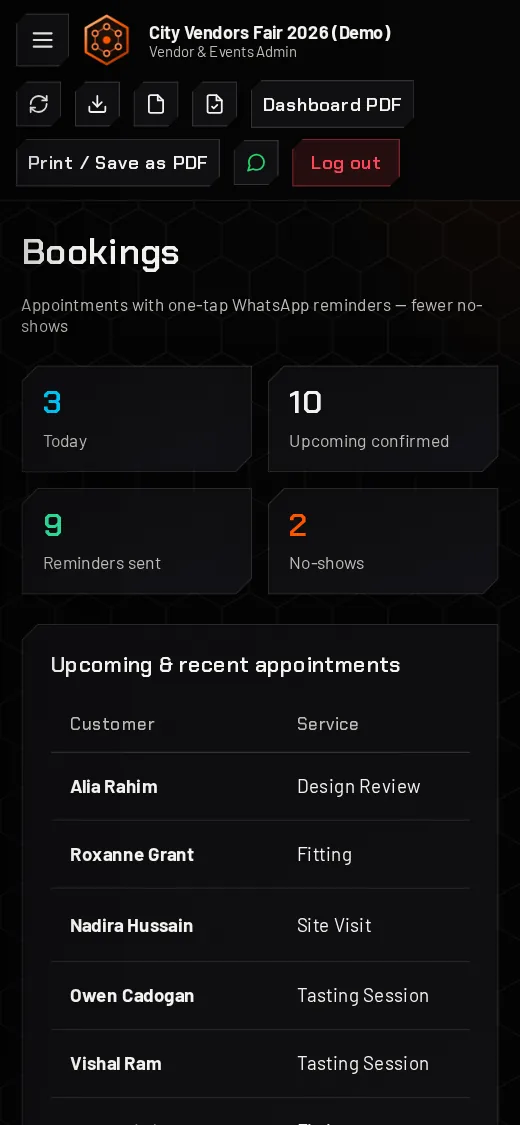
Bookings with WhatsApp reminders
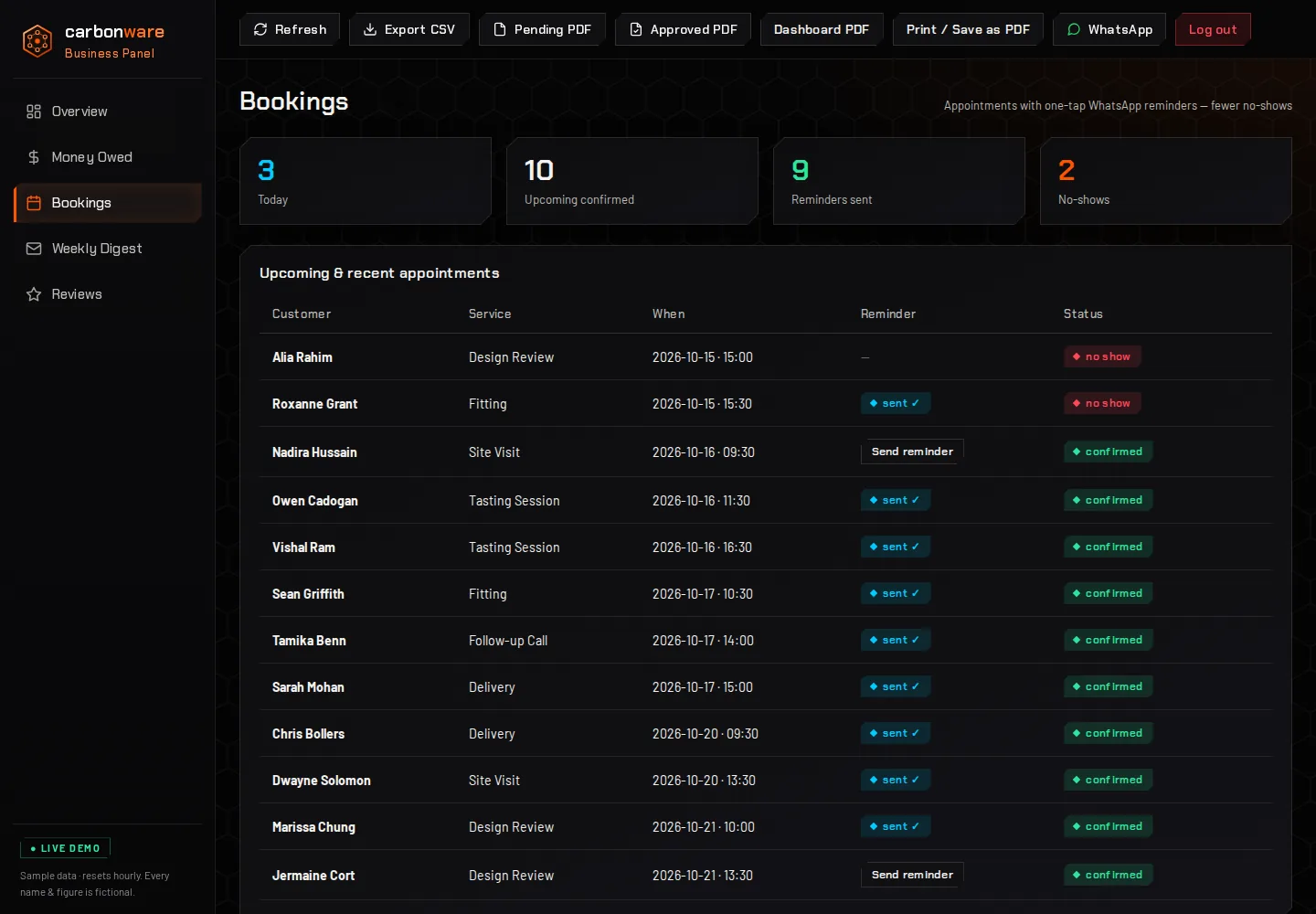
Appointments sit in one list with a status, and a reminder goes out in one tap.
- Today, upcoming and no-shows counted at the top.
- Reminder status on every booking: sent, or send it now.
- Status per booking: confirmed, done or no show.
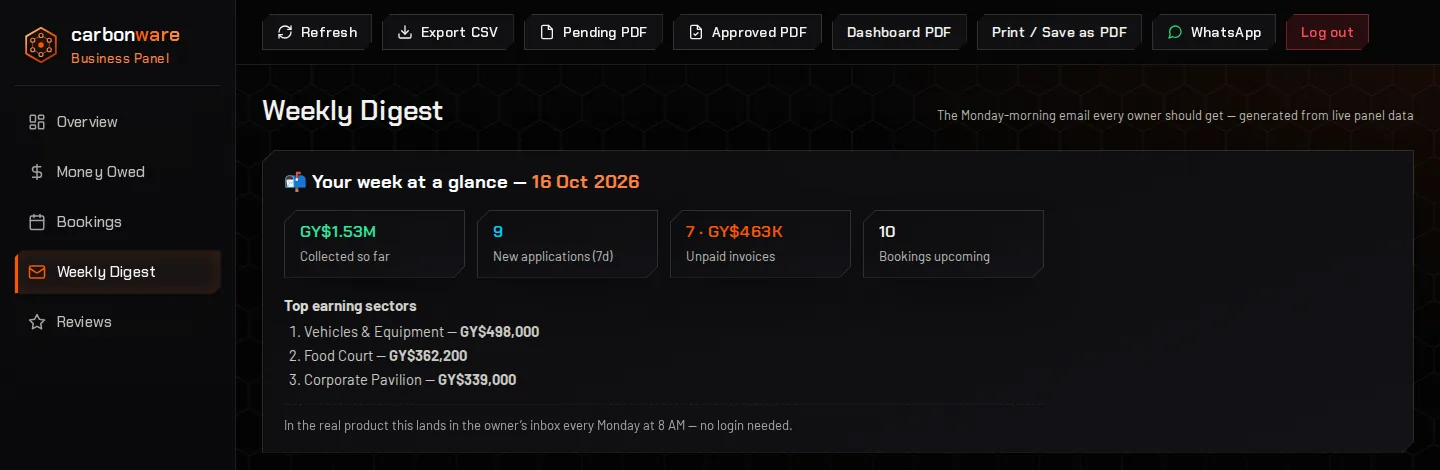
The Monday-morning summary every owner should get
A short weekly digest built from the live panel data, so you see the week without logging in.
- Collected so far, new applications, unpaid invoices and upcoming bookings.
- Top earning sectors for the week.
- In the real product it lands in the owner’s inbox every Monday at 8 AM.
Turn happy customers into Google reviews
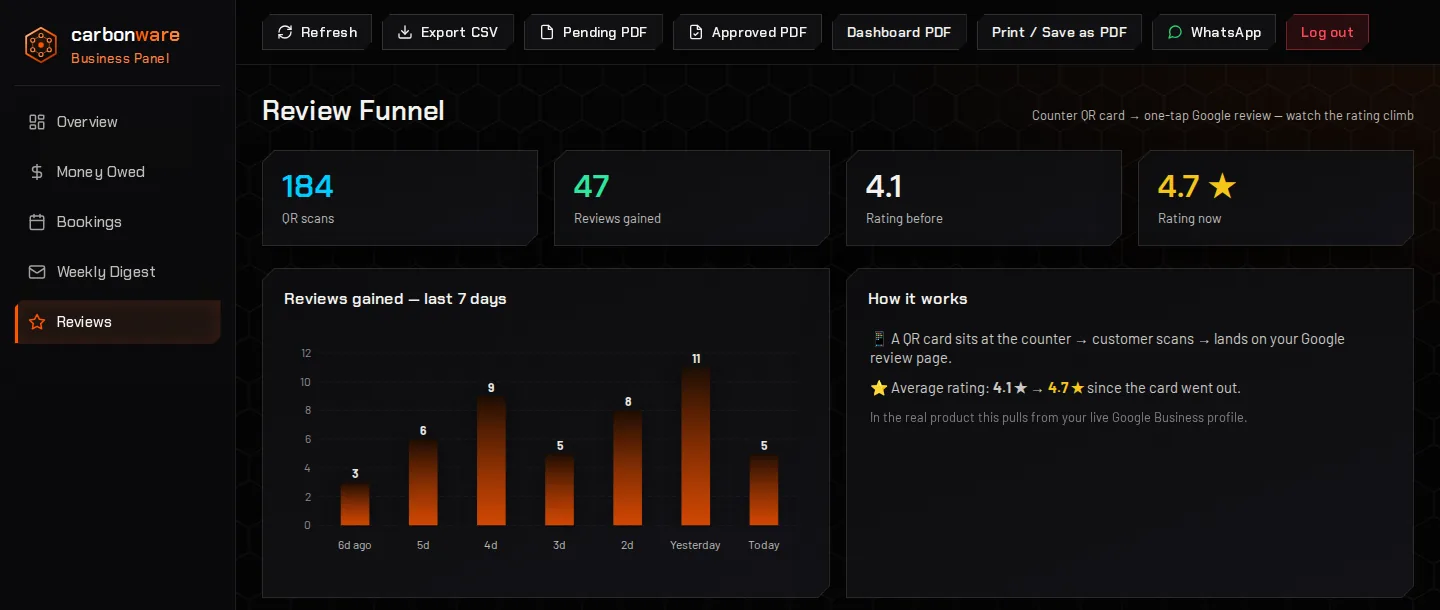
A QR card at the counter takes customers straight to your Google review page, and the panel shows how it is working.
- Counts QR scans and reviews gained over the last seven days.
- Shows your rating before and now.
- In the real product it reads from your live Google Business profile. The figures in the demo are sample data.
Everything in the panel
Every function in the live demo, screen by screen. Open a card to see the detail. Your panel starts from these and is changed to fit how you work.
Sign-in and safetyOwn logins, lockout, live status
- Own login for each person; passwords are never stored in plain text, and sessions expire on their own.
- Show or hide the password while typing it.
- Lockout: after repeated wrong passwords, that connection is blocked for up to 15 minutes.
- Sign-in alerts: the owner can get a phone alert on every sign-in and on every blocked attempt.
- Status light: green when everything is online, red with a note while an update runs, so nobody makes changes mid-update.
- Who is in: shows how many people are working in the panel right now.
OverviewLive totals, seven charts, money summary
- Four live totals: applications, approved (paid, partly paid and awaiting payment), pending review (with rejected) and revenue (with the amount collected).
- Updates every 15 seconds; figures roll to their new values when something changes.
- Charts: applications by sector, booths by size, application status, furniture allocated against extra, money collected by payment method, bands and vehicle passes, and food against games booths when you use them.
- Furniture cards: tables and chairs allocated automatically, extras requested and the combined totals.
- Revenue and deposits: booth fees billed and collected, split by MMG, bank transfer and cash, what is still outstanding, refundable deposits owed and paid, part payments and the balance left on them.
ApplicationsPublic form, filters, search, sort
- Public application form that feeds the list; the server works out every price itself, so a form cannot be tampered with, and it is protected against spam.
- Status buttons: all, pending, approved, partly paid, paid and rejected.
- Filters: sector, booth size, payment method, sub-category (food, games or general) and booth allocated or not.
- Sort by newest, name, booth size, status or booth number.
- Search by name, company, application number or email, with a count of what is showing.
- Click any row to open the full file.
The customer fileDetails, booth, changes, history
- Contact details with email, phone and a WhatsApp link; a quick WhatsApp box opens a chat with any number, with the country code added (Guyana, USA, Canada).
- Booth and furniture: nights, allocated and extra tables and chairs, bands and vehicle passes.
- Tag the sub-category and allocate a booth number.
- Amend after a negotiation: sector, size, quantity, furniture, passes, fee and payment mode, with a reason, and refresh the invoice to match.
- Version history: the application exactly as submitted plus every change, who made it and when. Nothing is ever lost.
- Download the application as a PDF, or delete it after a confirmation.
Invoices and paymentsApprove and send, part payments, receipts
- Edit the invoice line by line, add or remove lines and add a note; the total updates as you type.
- Save, preview the PDF, then approve and send: the applicant gets the approval email with the branded PDF invoice attached.
- Re-send the invoice after changes; for a part payment it shows the balance.
- Record part payments by MMG, bank transfer or cash with a note, see the balance, and remove a wrong entry.
- Split a payment across MMG, bank and cash for the reports.
- Proof of payment: upload photos or screenshots up to 25 MB with a progress bar; only people signed in can see them.
- Mark as paid and confirm: the applicant gets a payment-received email, and you can download a receipt PDF stamped paid.
- Reject, re-open or revert to approved; an application with payments on record cannot be rejected until they are removed, so money never vanishes from the totals.
Reports and exportsCSV, PDFs, printing, WhatsApp tool
- Export to CSV for a spreadsheet.
- Pending PDF and approved PDF: every application in that state in one document.
- Dashboard PDF of the overview.
- Print or save as PDF on white paper: landscape pages, with charts recoloured for paper and never split across two sheets.
- Refresh on demand, and a WhatsApp tool for any number from the top bar.
Money owedWho still owes, one-tap nudge
- Totals: still outstanding, invoices unpaid, collected and paid applications.
- Every unpaid invoice with company, contact, invoice number, amount and status.
- WhatsApp nudge for each one, with the reminder message already written.
BookingsAppointments and reminders
- Totals: today, upcoming confirmed, reminders sent and no-shows.
- Every appointment with customer, service, date and time, reminder status and booking status.
- Send a WhatsApp reminder in one tap; the list shows it as sent.
Weekly digestThe owner's Monday summary
- The week at a glance: collected so far, new applications in the last seven days, unpaid invoices and upcoming bookings.
- Top earning sectors for the week.
- In the real product it lands in the owner’s inbox every Monday at 8 AM.
ReviewsQR card to Google reviews
- QR scans, reviews gained, rating before and rating now.
- Seven-day chart of reviews gained.
- In the real product it reads from your live Google Business profile; the demo figures are sample data.
Behind the scenesEmails, audit log, recovery, backups
- New application emails: the organiser is told to review it, and the applicant gets a confirmation with their application PDF attached.
- Audit log of every action taken in the panel.
- Safety log: every submission is also written to a separate log, so a lost record can be recovered.
- Nightly backups.
- Works on a phone, with the menu tucked behind a button.
The demo sends no emails or alerts, and its sample data goes back to fresh every hour.
Works on the phone in your pocket
Check who owes you, confirm tomorrow’s bookings or review an application away from the desk. The panel adapts to phone screens; these are the live demo at phone width.
Built your way
The demo is one example. Whatever you need, we build it in: tell us how you work, we shape the panel around it, and we keep changing it as you grow.
- Your screens and fields: add, remove or rename anything you track.
- Your forms: the public form asks exactly what you need.
- Your fees and invoices: your packages, prices, deposits and wording.
- Your reports: the totals, charts and exports you actually use.
- Your name and colours: the demo wears our HIVE 1.0 look; yours can wear your brand.
- Your steps: approvals, reminders and follow-ups in the order your team works.
Events and expos
Vendor applications, sizes and allocations, deposits and outstanding balances, with a record of every change.
Associations and chambers
Membership applications, approvals, dues and invoices in one place instead of a shared inbox.
Organisations with their own process
Registrations, approvals, fees and documents shaped around the way your team already works.
Running a shop, salon or hotel?
HIVE 1.0 is our ready-made system for everyday businesses, US$40 a month with everything included. See HIVE 1.0.
Secure from day one
These come as standard with every custom panel.
Protected logins
Each person signs in with their own password. Roles that limit what each person sees are built to order.
Audit trail
Every change is recorded with who made it and when, next to the application as it was first submitted.
Nightly backups
Automatic nightly backups, so a bad day never costs you your records.
Need more than the demo shows?
These are built to order for your panel. Each one is quoted before we start.
Staff roles and permissions
Owner, manager and staff each see only what they need.
Customer and member logins
A private area where your customers check their own records and requests.
Custom forms and workflows
Forms, approvals and steps shaped around how you actually work.
Automatic WhatsApp notices
Reminders and alerts sent from your own WhatsApp number, beyond the one-tap reminders.
Password reset and two-step login
Self-service resets and an extra check at sign-in.
CRM and system links
Connect the panel to the tools you already use.
How a project runs
No build fee, and the monthly price agreed before any building starts.
-
Tell us how you run today
Your forms, your fees, your spreadsheets. Send it by WhatsApp or the contact form.
-
We scope it with you
A dedicated scoping session, then a written proposal with a timeline.
-
Price agreed before we build
You know the monthly price up front, and nothing is built until you agree.
-
We build and launch it
You try it, we adjust it, and it goes live. Then US$40 a month keeps it running, with unlimited edits and nightly backups.
Online stores and larger builds such as web apps and portals are quoted per project and include a panel. The monthly fee belongs to the panel, not the website: it is US$40 a month, with unlimited edits and nightly backups. See the full rate card.
Common questions
Can I try the panel before I talk to anyone?
Yes. Open demo.carbonware.ca and sign in with demo / carbonware2026. The data is sample data that resets every hour, and every name and figure is fictional.
Is the demo exactly what I would get?
The demo is one example. Each panel is designed around your own forms, fees and workflow, so the screens, fields and reports are built for how your business runs.
Can you change anything in the panel?
Yes. The screens, the fields and forms, the fees and invoices, the reports, the name and colours, and the steps your team follows can all be changed to suit you. Changes to your panel are part of the unlimited edits in the monthly fee; brand-new screens or features are quoted before we start.
Has anyone used the panel for a real event?
Yes. It was used by the Essequibo Chamber of Commerce & Industry for their event.
Does it work on a phone?
Yes. The panel adapts to phone screens, so you can check balances, bookings and applications away from the desk.
What does a custom panel cost?
There is no build fee. A custom panel is US$40 (GY$8,000) a month, and that includes unlimited edits and nightly backups. New screens or features are quoted before we start. Larger custom builds, such as web apps, online stores and portals, include a panel and are quoted before we build, and their panel is the same US$40 a month.
Is there a ready-made system for shops, salons and hotels?
Yes. HIVE 1.0 is our ready-made business system for everyday businesses: customers, bookings, invoices, quotes, stock, payroll, taxes, bookkeeping and an app for hotels and guesthouses, US$40 a month with everything included. It has its own live demo.
Does the panel take online payments?
The demo records and tracks payments made by MMG and bank transfer, with proof-of-payment photos and outstanding-balance views. Taking card payments online is a separate feature that would be scoped with you.
Is my data protected?
Password-protected logins, audit trails and automatic nightly backups come as standard. Staff roles that limit what each person sees are built to order.
How do I get started?
Request a proposal through the contact form or message us on WhatsApp. Tell us how you run things today and we will scope it, send a proposal with a timeline and agree the monthly price before we build.
See it for yourself
The demo is live now. Click around, then tell us what you would change.
Demo login demo / carbonware2026. Sample data, resets every hour.