Your whole business. One hive.
Customers, bookings, invoices, quotes, stock, payroll, taxes and full bookkeeping in one system, built for how business runs in Guyana.
US$40 a month, everything included
The demo login is already filled in: press Sign in. (Username demo, password try-the-hive.) A sample salon, back to fresh data every night.
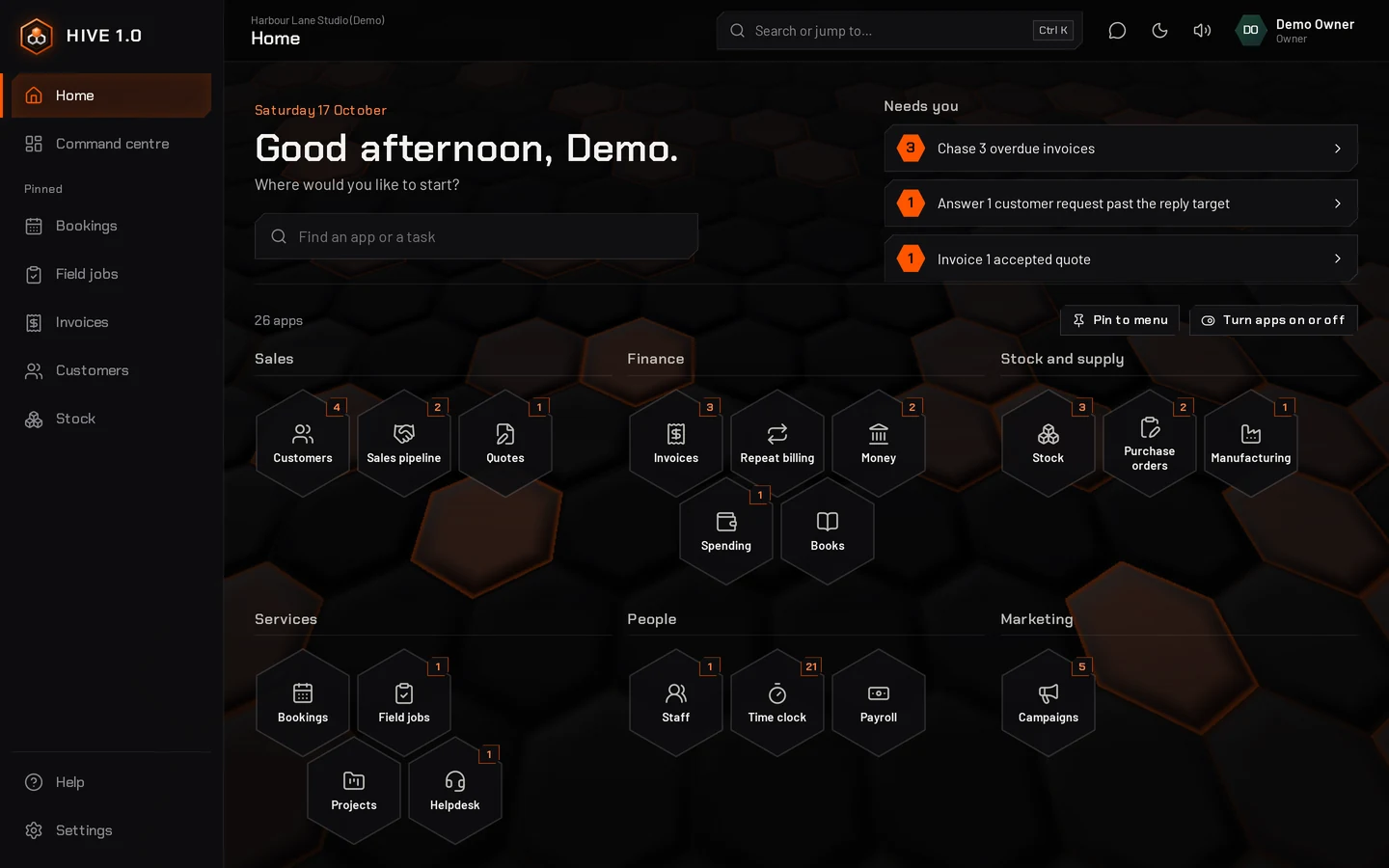
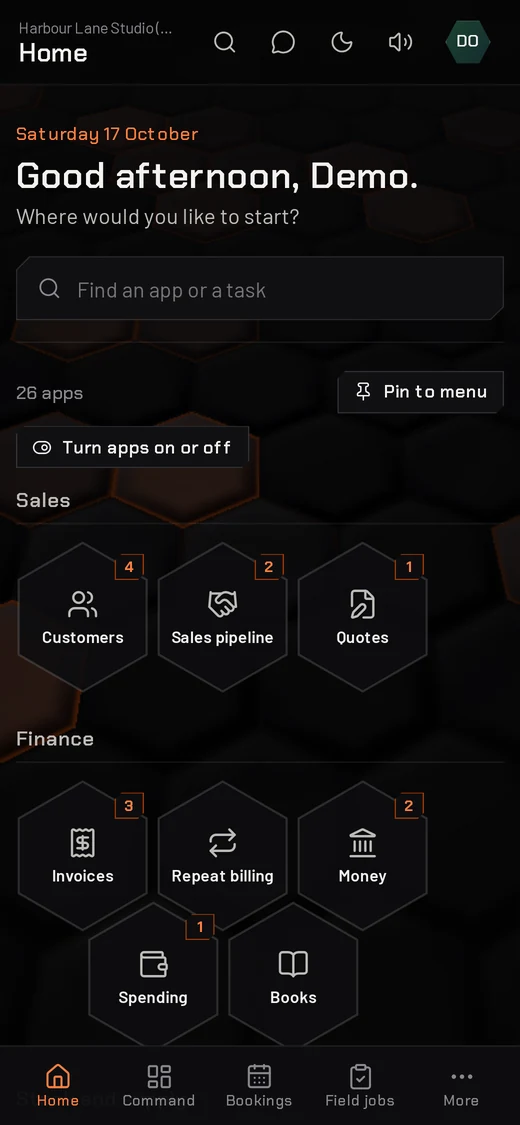
Screenshots of HIVE 1.0 running sample businesses. Every name and figure is fictional.
- G$ to the whole dollarBills, VAT and charges work out to whole Guyana dollars. Switch it off if you need cents.
- Taxes, the GRA wayVAT, PAYE, NIS and withholding worked out each month, with the files GRA and NIS take.
- MMG on every invoiceRecord each MMG payment with its transaction ID. A registered MMG merchant with API keys can have it connected.
- WhatsApp in one tapReminders, receipts and quotes written for you. One tap opens the chat; you press send.
Records that keep you right with GRA and NIS
HIVE 1.0 keeps the records a business in Guyana is asked for while you work: every sale, bill, payslip and tax in one place, ready when GRA, NIS or your accountant needs them.
Every tax, every month
VAT, PAYE, NIS and withholding tax on one screen, with what is paid, what is left and the date each is due. Anything late is flagged.
Files GRA and NIS take
PAYE and withholding files in the layout GRA eServices takes, the NIS schedule in the NIS layout, and the VAT return figures line by line.
NIS and PAYE on every payslip
Worked out at the National Insurance Scheme's rates and GRA's rules for 2026, with the working shown and the age rules applied from each birthday.
VAT kept as you go
Each invoice carries its VAT treatment and each bill and receipt its VAT, so the month's figures are already there when the return is due.
Books your accountant can use
Proper double-entry books with profit and loss, a balance sheet and a year-end pack, and a login for your accountant.
Staff records in order
NIS numbers, TINs and leave kept for each person, hours from the Time clock, and each person's earnings for the year for their 7B.
You stay in charge of filing: download the files, check them with your accountant, and upload them on GRA eServices. See the Taxes screen
Switch on what you need
Every business starts simple, with bookings, invoices and the books. These are the apps most businesses reach for first; switch any on or off later, and nothing you saved is lost. Tap a cell to see it.
Orange cells come with every plan. The rest are apps you switch on from inside HIVE 1.0; Every app opens the full list.
One login. Every part of the business.
Every screen below is HIVE 1.0 itself, running sample businesses. For everything each app does, see the full list.
Know where the day stands
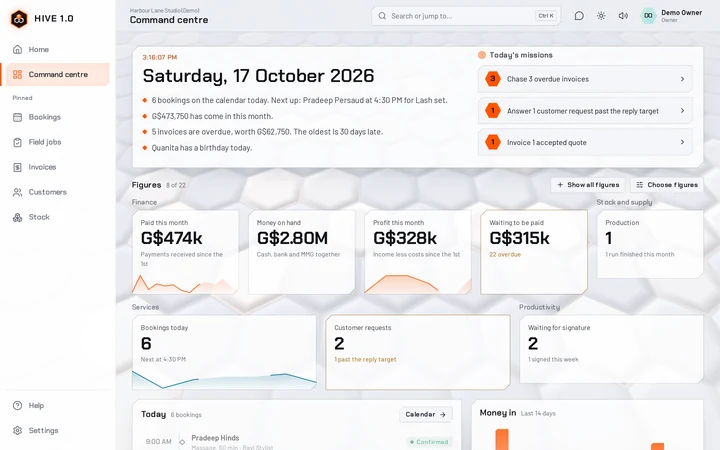
Sign in and Home lays out every app you use, with what needs you today. The Command centre adds the figures behind the day.
- Home: every app in its group, a search box, and the apps you use most pinned to the menu
- Needs you: chase overdue invoices, invoice accepted quotes, restock what is running low
- A daily briefing and live figures for money in, money on hand, profit and stock value; each person picks the ones they see
- The same tabs in every app, with Settings last
- Search or jump anywhere with Ctrl + K
- A dark or light look, whichever suits your eyes
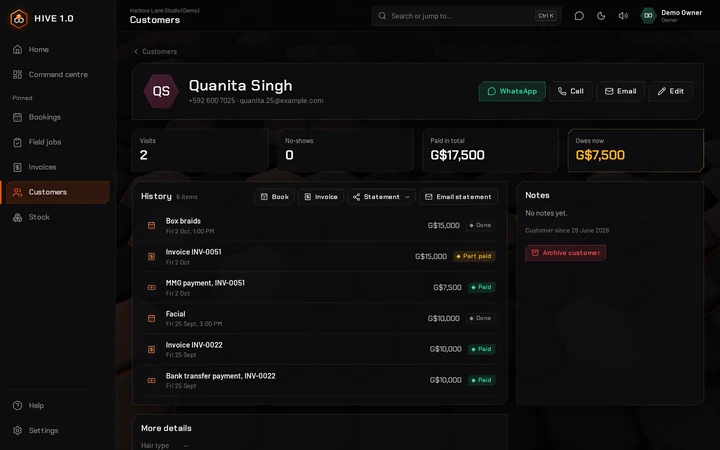
Every customer, and their whole story
Bookings, quotes, invoices and what they owe on one page, with WhatsApp a tap away.
- Phone, email, birthday, tags and notes
- Book, invoice or send a statement from their page
- Bring your list in from Excel, CSV or your phone's contacts
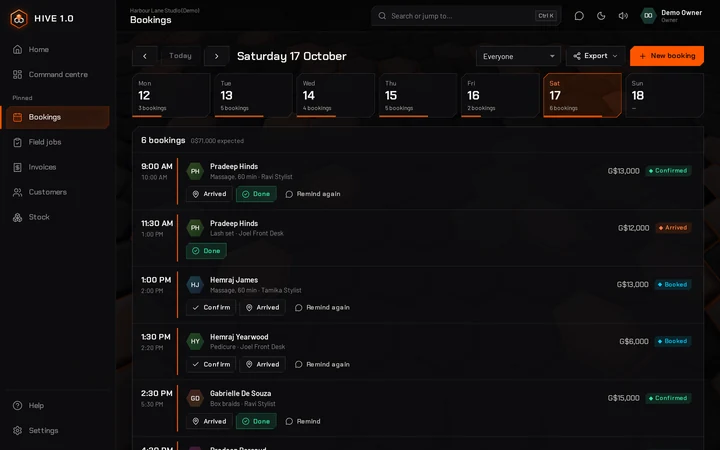
Bookings without the back-and-forth
See the whole week at a glance, and each day by staff member.
- A warning before anyone is double-booked
- Booked, confirmed, arrived and done, with no-shows tracked
- WhatsApp reminders written for you, opened in one tap
- Turn a finished booking into an invoice
Invoices that get paid
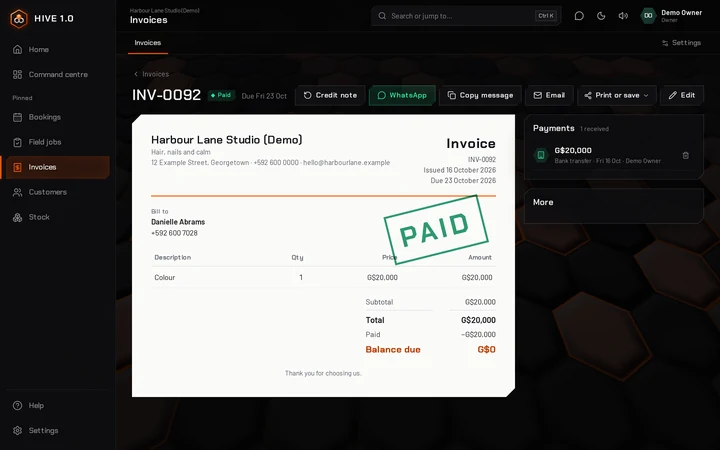
Branded invoices in Guyana dollars, with the VAT treatment you choose for each one.
- Standard 14%, zero-rated, exempt or not registered for VAT
- Part payments by cash, MMG, bank, card or cheque
- A WhatsApp message with the total and due date, email, PDF or Word, or print
- Credit notes and refunds when things change
Quote it, win it, bill it every month
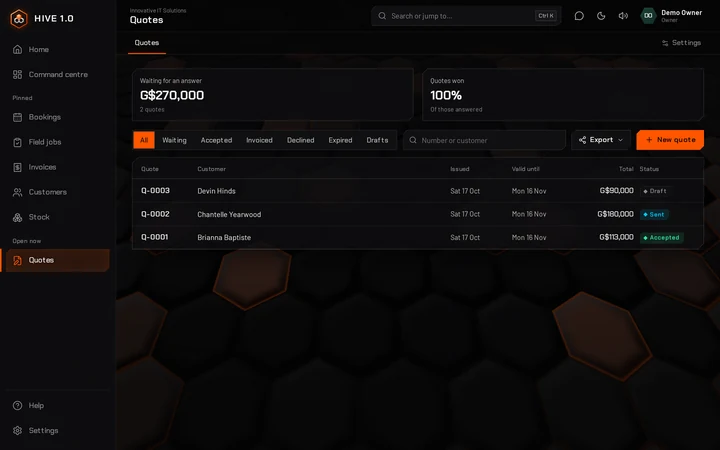
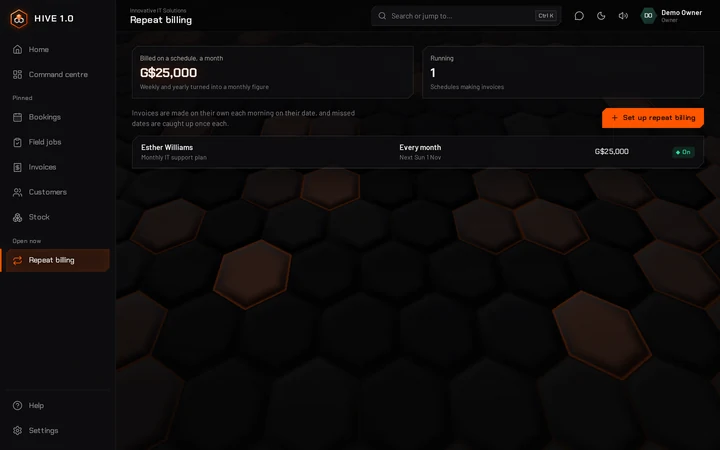
Send a quote, turn it into an invoice when they say yes, and let repeat billing handle the monthly plans.
- Quotes by WhatsApp, email or PDF, marked accepted or declined
- An accepted quote becomes an invoice in one tap
- Invoices made on their own each week, month or year
- Unanswered quotes come back to you as a reminder
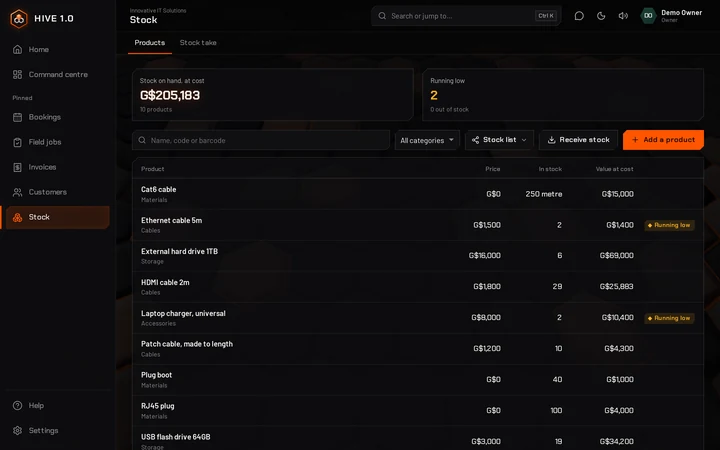
Know what is on the shelf
Stock is kept at average cost, so the value on screen matches your books.
- Low-stock warnings before you run out
- Receive deliveries and count the shelf with a stock take
- Parts used on field jobs and materials used in Manufacturing come out of stock
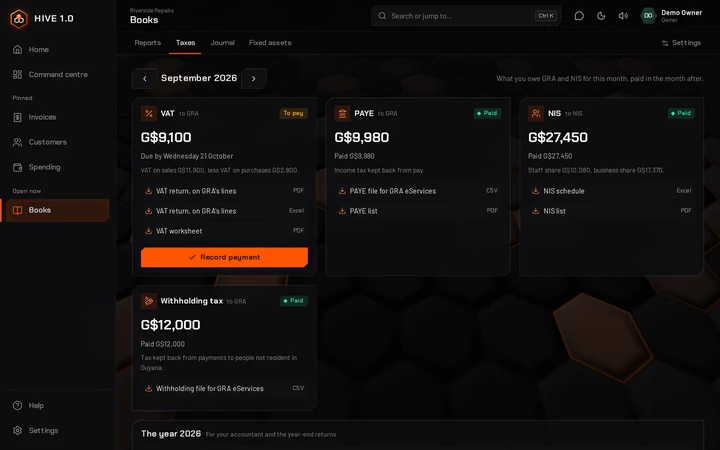
Taxes for GRA and NIS, ready to file
One screen shows what the business owes for the month, what is paid and when the rest is due.
- VAT, PAYE, NIS and withholding tax for each month in one place
- Due dates worked out: PAYE and withholding by the 14th, NIS by the 15th, VAT by the 21st
- GRA's VAT return figures, line by line, as PDF or Excel
- PAYE and withholding files in the layout GRA eServices takes, and the NIS schedule in the NIS layout
- Record each payment and the month shows paid
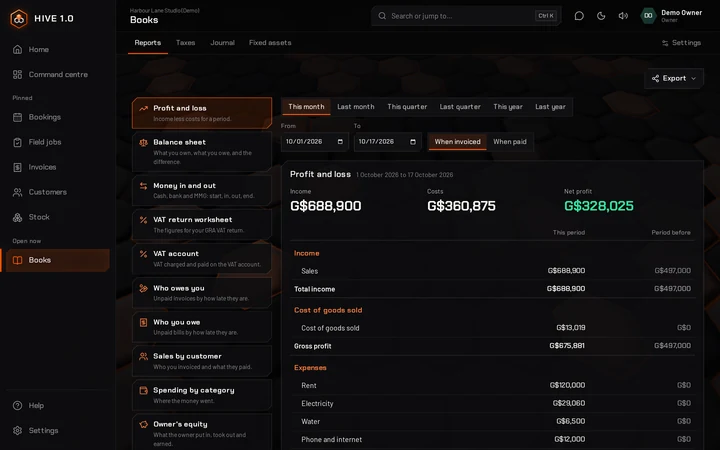
Books your accountant will thank you for
Every invoice, payment and bill goes into the books on its own. Money shows your cash, bank and MMG, staff record what they pay out in Spending, and Books holds the reports.
- Profit and loss, balance sheet, cash flow and trial balance
- Taxes: VAT, PAYE, NIS and withholding for each month, with the files for GRA and NIS
- Spending with receipt photos, bills, suppliers and loans
- A year-end pack in PDF and Excel, and an accountant login
- US-dollar accounts and withholding tax, switched on only if you need them
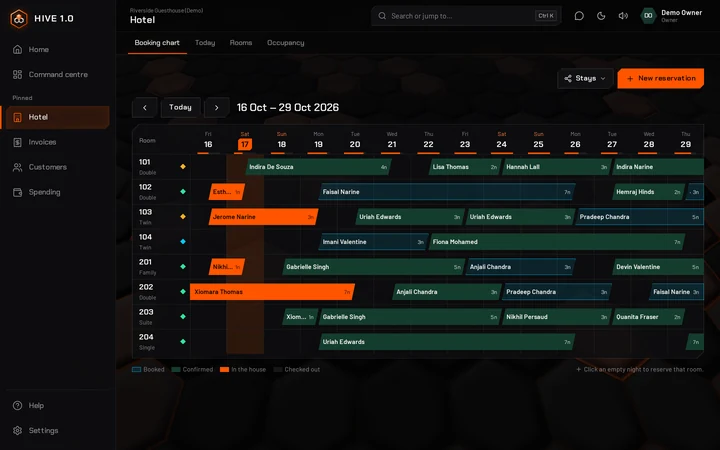
Run a guesthouse or hotel
The hotel app shows every room, night by night, on one booking chart.
- Reservations with deposits and clash warnings
- Check-in, check-out and a guest bill with extras
- Housekeeping and occupancy at a glance
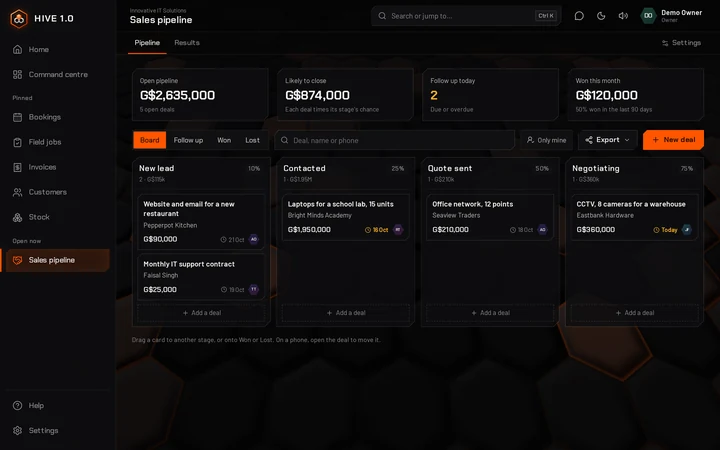
Turn enquiries into sales
Log each WhatsApp enquiry, walk-in or call as a deal and follow it all the way to the sale.
- A board from new lead to negotiating: drag a deal to its next stage
- Follow-up dates, with today's follow-ups in your missions
- A WhatsApp follow-up in one tap, and a quote made from the deal
- Results by month, by where sales come from and why deals were lost
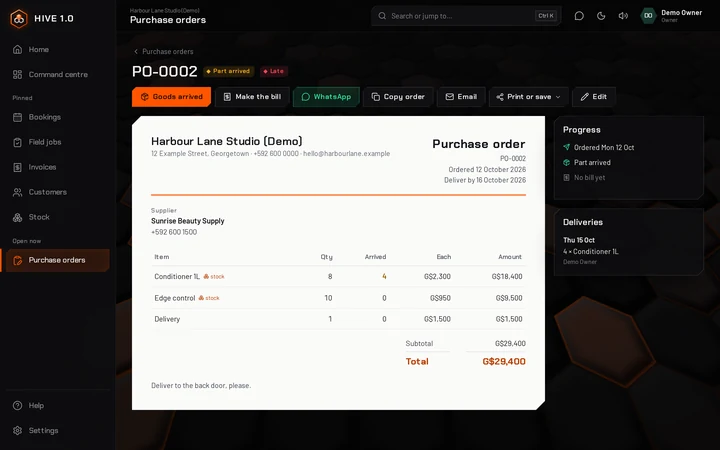
Order from suppliers and track what arrives
Send the order, tick off what comes in, and your stock and books follow.
- Orders sent by WhatsApp, by email or as a PDF
- Part deliveries go straight into stock
- One tap turns what arrived into a bill in Spending, VAT included
- Order low stock fills an order with everything running low
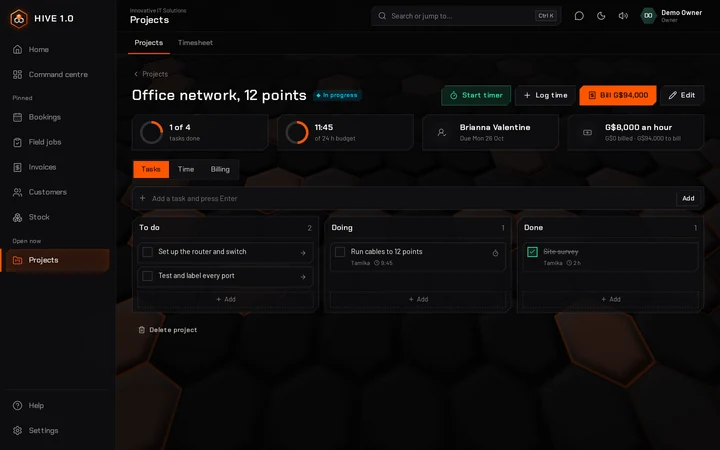
Track the job and bill the hours
Break a job into tasks, log the hours, and invoice the customer from the work done.
- Tasks in To do, Doing and Done
- Time logged by hand or with a timer, and a weekly timesheet for each person
- Bill by the hour or a fixed price, in parts or all at once
- Hours are marked billed, so nothing is charged twice
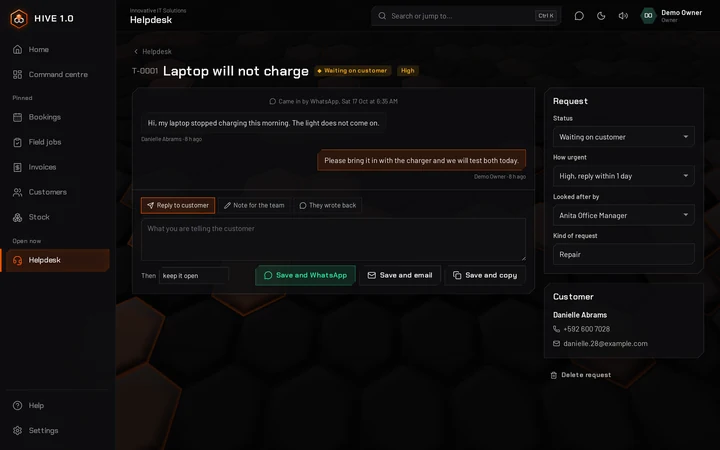
Every customer request answered
Log requests that come in by WhatsApp, phone or at the counter, each with a number and someone to look after it.
- A time to reply by, set by how urgent it is, with late requests flagged
- Replies by WhatsApp or email, and notes just for your team
- New, waiting, solved and closed, so nothing is forgotten
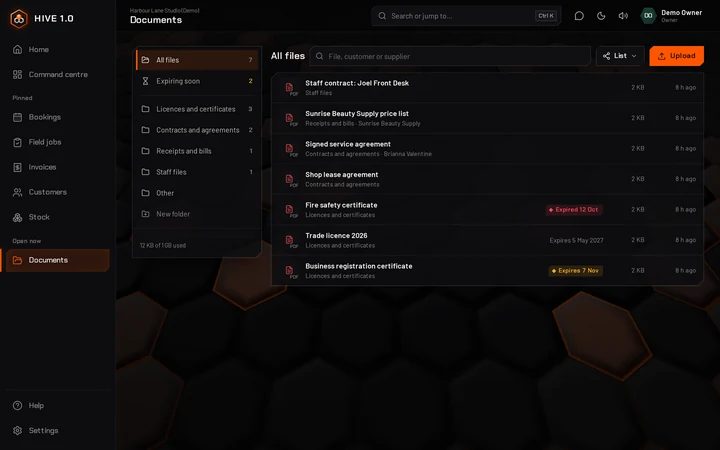
Your business papers in one place
Licences, contracts, receipts and staff files in folders, linked to customers and suppliers.
- PDFs, photos, Word and Excel files, uploaded from a computer or a phone
- A reminder a month before a licence or certificate expires
- Files are kept with your backups
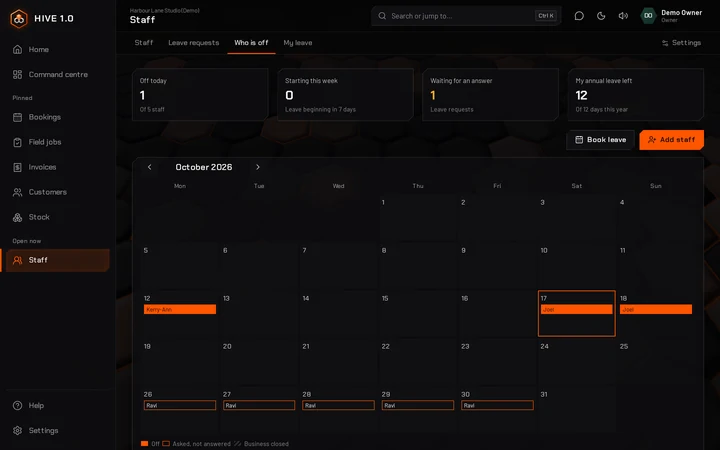
Your team and their time off
Staff files with a private part for managers, and leave asked for and approved in HIVE 1.0.
- NIS number, TIN, pay and emergency contacts, seen only by owners and managers
- Staff ask for leave on their phone; a manager approves
- Leave balances worked out from the allowances you set
- A calendar of who is off, with closed days left out
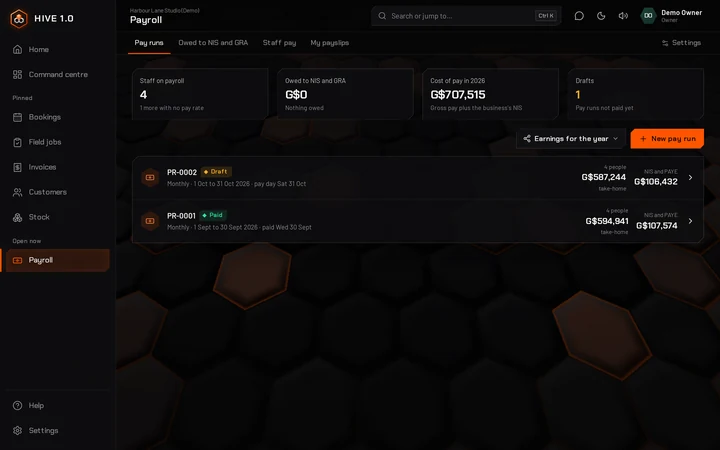
Pay day, with NIS and PAYE worked out
Pay your staff weekly, every two weeks or monthly. HIVE 1.0 works out NIS at the National Insurance Scheme's rates and PAYE to GRA's rules from 1 January 2026.
- Hours from the Time clock for staff paid by the hour
- Payslips as a PDF, by email, or written out in a WhatsApp message; staff can see their own if you switch it on
- What you owe NIS and GRA each month, with the date each is due
- With Money and books on, paying puts the wages and what you owe NIS and GRA in the books
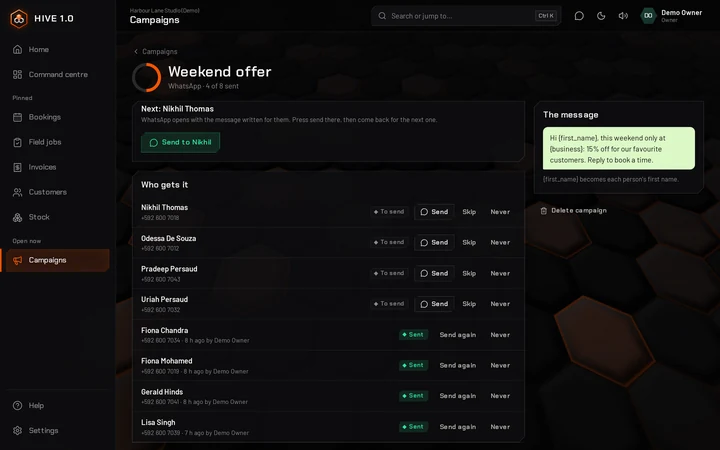
Offers and reminders to the right people
Choose who gets it and write it once. HIVE 1.0 puts each customer's first name in.
- Customers with a tag, birthdays, people who have not been back, new customers, or those who owe you
- Sent on WhatsApp one by one, with the message already written for each person, or by email to everyone at once
- Anyone who asks to stop is left out of future campaigns
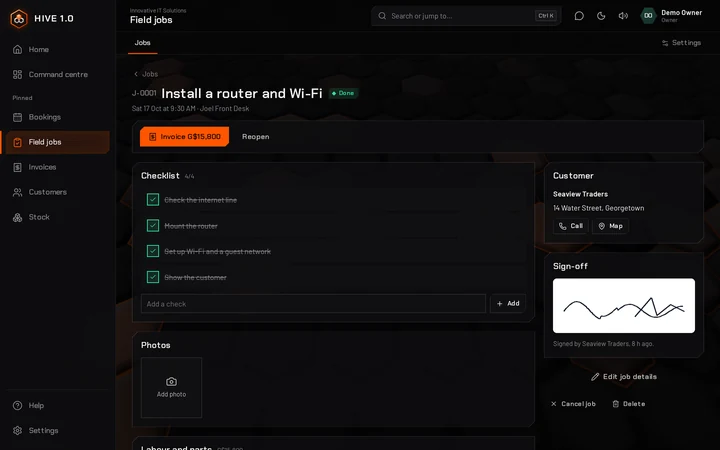
Work on site, from booking to invoice
For repairs, installs and home visits, with the job on the technician's phone.
- Tell the customer you are on the way on WhatsApp, with how long you will be
- A checklist, photos, and the labour and parts used
- The customer signs on the phone, and the job becomes an invoice
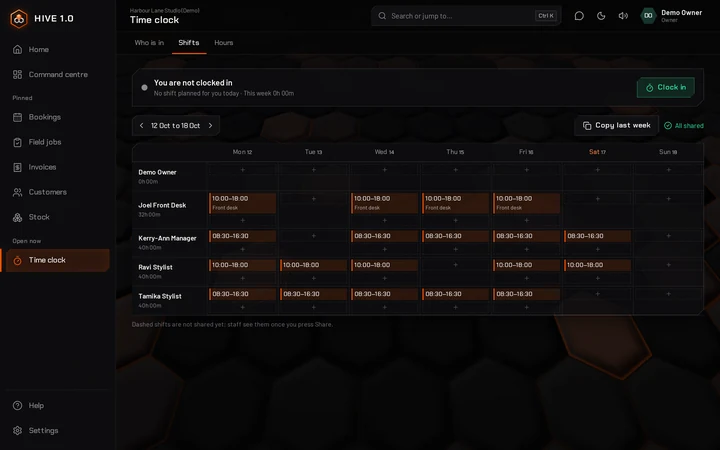
Who is working, and the hours for payroll
Staff clock in and out on their phone. Managers plan the week and see who is in.
- A weekly shift planner, shared with staff when it is ready
- Late starts and forgotten clock-outs flagged for the manager
- Each person's hours against their shifts, ready to export
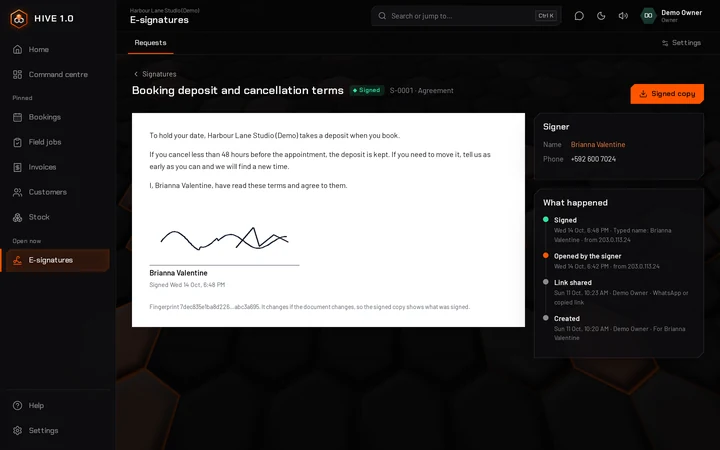
Signed on their phone
Send a quote, an agreement or a PDF as a private link on WhatsApp. The customer reads it, types their name and signs with a finger.
- A signed copy as a PDF, for you and for the customer
- A record of when it was sent, opened and signed
- Signing a quote marks it accepted
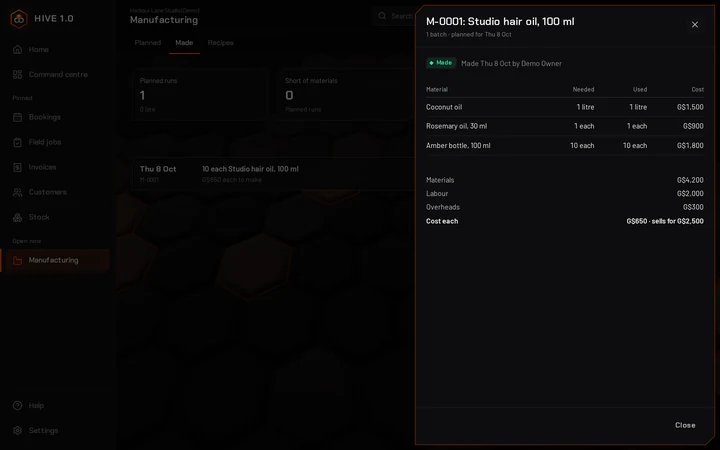
Know what each thing you make costs
For bakers, food makers, crafters and anyone who turns materials into products. A recipe lists what one batch uses.
- Materials come out of stock and the finished goods go in when a batch is made
- The cost of each item, from what you paid plus labour and overheads, next to its price
- Planned batches short of materials are flagged before the day
How things are done, written down once
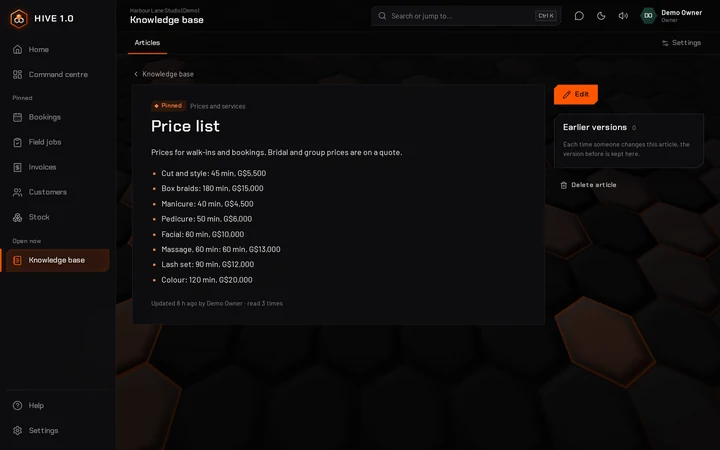
Opening and closing, prices, policies and who to call, in one place new staff can search.
- Search finds any word in any article
- Pinned articles, and some just for owners and managers
- Every earlier version kept, and one tap to go back
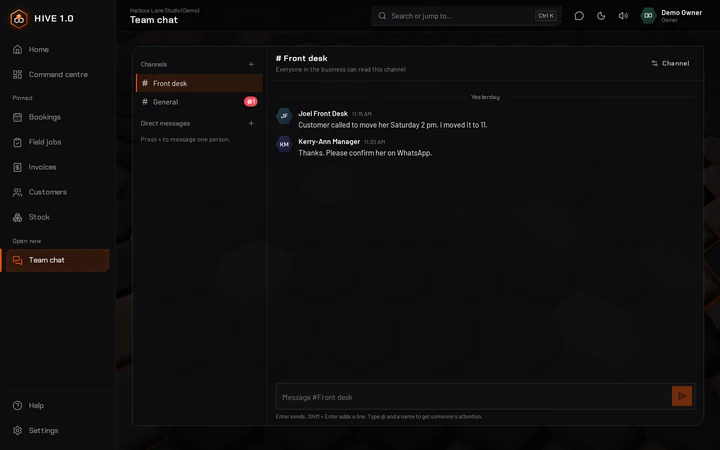
Work talk, kept with the business
Channels for the whole team and private messages between two people, without anyone's personal number.
- @ mentions show in red until they are read
- New messages arrive by themselves, with a line where you stopped reading
- Managers can add channels and remove messages
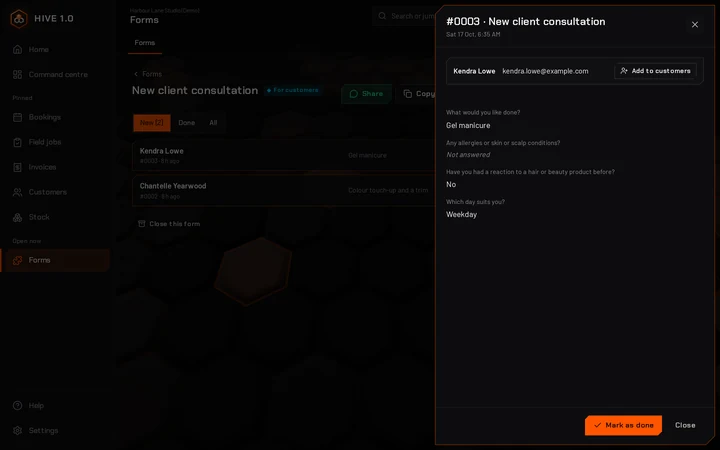
Your own forms and customer details
Consultation, feedback or intake forms that customers answer on their phone from a link or a QR code.
- Answers matched to your customers, and new people added in one tap
- Checklists your staff fill in at work
- Your own fields on every customer, such as hair type or account number
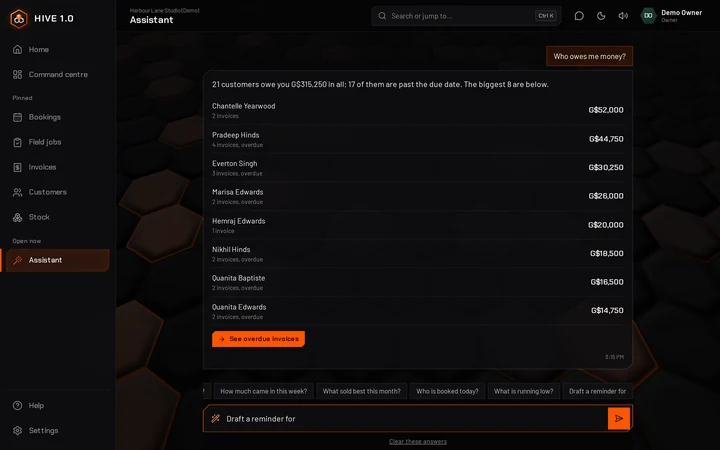
Ask in plain words
Who owes you, what came in this week, what sold best, who is booked today, what is running low.
- Answers from your own records, with links to open them
- A payment reminder written for you, ready for WhatsApp
- Nothing you ask leaves HIVE 1.0
Everything in HIVE 1.0, app by app
The full list: 333 things HIVE 1.0 does today. Tap a heading to open it.
In every plan
HomeThe first screen after you sign in
- Every app you use, laid out as a honeycomb in its group: Sales, Finance, Stock and supply, Services, People, Marketing, Productivity and Insights
- A search box that finds an app or a task as you type; Enter opens the first one
- Needs you: the three most important jobs today, one tap from each
- A small count on an app when something in it needs you
- Pin up to six apps to the menu; each person pins their own
Command centreThe whole business on one screen
- A daily briefing: bookings today and who is next, money in this month, overdue invoices, birthdays
- Today's missions: up to three jobs picked from your own figures, most important first
- Figures from every app, grouped the same way as Home; each person chooses which they see
- Today's bookings on a timeline, money in over the last 14 days, the overdue list and the latest activity
CustomersAlways on, in every plan
- Phone, email, address, birthday, tags and notes for each customer
- A page per customer: visits, no-shows, paid in total, what they owe, and every booking, quote, invoice and payment
- WhatsApp and call buttons; book, invoice or send a statement from their page
- Search, filter by tag, and archive people you no longer deal with
- Import from Excel, CSV or contacts exported from an iPhone or Android phone, with a preview first and no duplicates
- Your own extra fields on every customer (with the Forms app)
Apps and SettingsSet it up your way
- Every business starts with Bookings, Invoices and Money and books; tap any other app to see what it does before you switch it on
- Turn apps on or off from Home (owners). Switching off hides an app; nothing is deleted
- Every app has the same tabs, with its own Settings last, seen only by owners and managers
- Business details, your TIN and NIS employer number, default tax rate, and Guyana-dollar amounts worked out to the whole dollar (or keep cents)
- Extra charges such as a service charge, delivery or packaging: a percentage or a fixed amount, on by default or added when needed, with a report of what they collected
- Logins with roles: owner, manager, staff, accountant and view-only; owners can reset a staff member's password
- Your password, two-step sign-in with an authenticator app and backup codes, and the option to require it for everyone
- Dark or light look, sounds and volume, calmer motion, and the moving honeycomb background on or off
Backups and recordsNothing gets lost
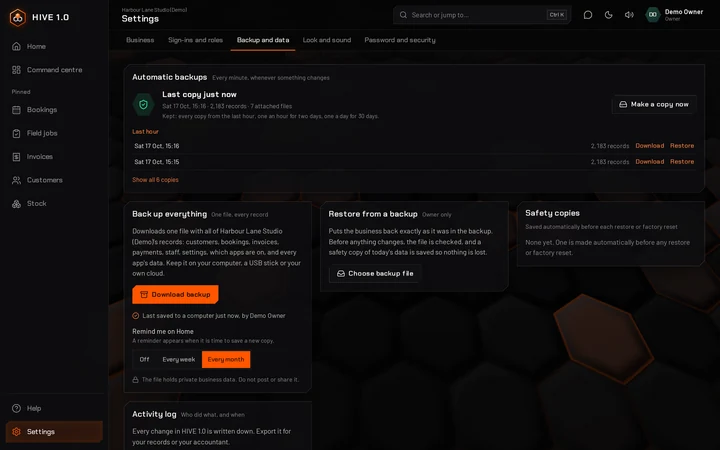
- A full copy of the business every minute whenever something changes: every minute for an hour, every hour for two days, every day for 30 days
- Go back to any copy; today's data is saved first, so a restore can be undone
- Download one backup file with everything and restore from it; it is checked for damage first
- See when a copy was last saved to a computer, and get a reminder on Home every week or month if you want one
- An activity log of every change, who made it and when, ready to export
- A factory reset back to blank, with a safety copy saved first (owner only)
Everywhere in HIVE 1.0On every screen
- Works in the browser on a phone, tablet or computer, and installs like an app with its own icon
- Screens you opened recently stay readable without internet
- Search customers, invoices, bills, suppliers, deals, projects, requests, documents and staff, or start a task, with Ctrl + K
- Lists export to Excel, CSV or PDF; documents print or save as PDF and Word
- WhatsApp messages written for you, with +592 numbers handled
- WhatsApp any number from the top of the screen without saving it first, in the WhatsApp app or WhatsApp Web
- Emails go out under your business name, and replies come to your business email
- A built-in manual you can search, with a list of everything HIVE 1.0 does, and a What's new list
The apps you switch on
Run the day
Bookings6 things it does
- A calendar of appointments with your services and their prices
- A week strip with how busy each day is; filter by staff member
- A warning when someone is already booked at that time, with the choice to book anyway
- Booked, confirmed, arrived and done, with no-shows and cancellations
- A WhatsApp reminder written for the customer in one tap
- Turn a finished booking into an invoice in one tap
Invoices9 things it does
- Invoices for a customer or a walk-in, with your usual services as buttons
- Due dates in one tap (7, 14 or 30 days), discounts, drafts
- VAT per invoice: standard 14%, zero-rated, exempt or not registered
- Part payments by cash, MMG (with the transaction ID), bank, card or cheque
- A paid invoice prints as a receipt with a PAID stamp
- A WhatsApp message with the total and due date, email, copy the message, print, or save as PDF or Word
- Credit notes for part or all of an invoice, and refunds
- Statements of account for each customer, to print or email
- Your number prefix and footer (bank or MMG details) in the Settings tab
Stock7 things it does
- Products with selling price, VAT, category and barcode
- Count stock, or not for things like delivery; a warning level for each product
- Receive stock with what it cost and how you paid: cash, bank, MMG or owed to the supplier
- Valued at average cost, so stock and the books agree
- Adjustments with a reason, such as damaged or found
- A Stock take tab: type what is on the shelf and only the differences are recorded
- A till for counter sales, if you switch it on, with every sale taken out of stock
Money9 things it does
- Money on hand in cash, bank and MMG together
- Money in without an invoice, and moving money between cash, bank and MMG
- Every account with its history and running balance; add your own accounts and codes
- Check bank, cash or MMG against a statement, tick by tick
- Budgets for each account by month
- Repeating items such as rent and wages, recorded in one tap when they come due
- A 30-day cash forecast with its lowest point
- Loans with the monthly payment split into interest and what comes off the loan
- US-dollar accounts if you switch them on: cash, bank or MMG kept in US$, with the rate on every entry and revaluing when rates move
Spending7 things it does
- Record spending with a category, VAT and a photo of the receipt (the camera opens on a phone)
- Split one receipt across categories; the owner's personal spending kept out of business costs
- Categories filled in from who was paid, such as GPL for electricity
- Bills from suppliers, paid in one go or in parts
- Suppliers with what you owe each one
- A log of business trips, kept apart from personal driving
- Withholding tax if you switch it on: kept back when you pay a supplier not resident in Guyana, with each month's total due to GRA
Books11 things it does
- Every invoice, payment, bill, sale and stock move written in as a proper double entry, on its own
- Profit and loss on an invoiced or a paid basis, compared with the period before
- Balance sheet, money in and out, trial balance, owner's equity, sales by customer, spending by category, who owes you and who you owe
- A VAT return worksheet and the VAT account; record each payment to GRA
- Taxes for each month: VAT, PAYE, NIS and withholding tax in one place, with what is paid and the date each is due
- GRA's VAT return figures line by line, the PAYE and withholding files in the layout GRA eServices takes, and the NIS schedule in the NIS layout
- Every report as PDF, Excel or CSV, and a year-end pack for your accountant
- Journal entries, opening balances, and bank or MMG statement import from CSV
- Fixed assets written off month by month, sold or written off with the gain or loss
- Close the books up to a date so nothing earlier can change
- An accountant login with full access to the books and view-only elsewhere
Quotes6 things it does
- Quotes with lines, discount and VAT, valid for as long as you choose
- Send by WhatsApp or email with a PDF, or print
- Quotes unanswered after five days come back to you as a reminder
- Quotes past their date are marked expired each morning
- They accepted: turn it into an invoice with the same lines in one tap
- Signing a quote with E-signatures marks it accepted
Repeat billing6 things it does
- Memberships, rent, tuition and monthly plans billed on a schedule: weekly, monthly, yearly or every few
- A first date and, if it ends, a last date
- Each invoice marked sent, emailed to the customer, or kept as a draft for you to check
- Billing on the 31st falls on the last day of shorter months
- Missed days are caught up once each, with their own dates
- Pause, bill early or stop; invoices already made are kept
Purchase orders6 things it does
- Order from your suppliers with items from Stock or typed in
- Send by WhatsApp or email, copy, print or save as PDF or Word
- Order low stock fills an order with everything running low
- Goods arrived: part deliveries go into stock at the order price
- Late orders flagged in your missions
- Make the bill from what arrived, VAT included (with Money and books)
Get paid and sell more
Payment proofs4 things it does
- Each MMG or bank-transfer screenshot kept with its transaction number
- The invoice it is for suggested by amount and name
- A warning when a transaction number or a picture was used before
- Recorded on the invoice in one tap
Tabs and layaway4 things it does
- Tabs for regulars who pay later, with a limit and a pay day
- Put things on a tab in a tap; payments clear the oldest bills first
- Layaway: a deposit, payments over time, and the item handed over when it is paid
- Balances on WhatsApp and statements to print
Hire purchase4 things it does
- A deposit, a flat yearly charge and the number of payments
- The payment plan worked out to the dollar, with every date
- Arrears and days behind for each customer
- WhatsApp reminders and a statement to print
Gift cards4 things it does
- Gift cards for any amount, with a code and a message
- Used on a sale or an invoice; what is left stays on the card
- Vouchers with a code: money off, a smallest spend, a limit and dates
- Gift card money kept as owed until it is spent
Loyalty4 things it does
- Points for every dollar spent, or stamps for a reward when the card is full
- Earned on sales and paid invoices
- Points used as money off a sale
- Each customer’s balance sent on WhatsApp
Orders board4 things it does
- Orders from the counter, the phone or WhatsApp on one board
- New, preparing, ready, out for delivery and done
- A WhatsApp update for the customer at each step
- An invoice from the order in one tap, paid or part-paid
WhatsApp desk4 things it does
- Each day’s reminders, birthday wishes and updates written for you
- Sent from your own WhatsApp in one tap each
- Late-bill reminders wait a week before coming back
- Your own saved messages with names filled in
Reviews4 things it does
- A private link asks customers how it went: stars and a line
- Everyone who answers sees your Google and Facebook review links
- Low ratings come to you first, by email or Telegram if you choose
- Your average rating and who to call back
Referrals4 things it does
- A code for each customer to pass on, with a ready WhatsApp message
- Who sent whom, and who sends the most
- The reward earned when the new customer first pays
- Loyalty points added by themselves if you use Loyalty
Customer portal4 things it does
- A private link for each customer, sent on WhatsApp or by email
- Their bills and receipts, with the invoice to open
- Their next bookings, points and payment plans
- You choose what they see, and can switch a link off any time
Brag cards4 things it does
- Picture cards from your own milestones, reviews, new products and vouchers
- Four styles, square posts and WhatsApp status
- Share straight from your phone or download
- Numbers rounded down so a card never claims more than your records
Campaigns5 things it does
- Ready messages for birthdays, we miss you, promotions and reminders
- Send to everyone, a tag, birthdays, people who have not been back, new customers or those who owe you
- First names and your business name filled in for each person
- Sent on WhatsApp one by one, with each message already written, or by email to everyone at once
- People who say never, or use the stop link in an email, are left out of every campaign
Sales pipeline7 things it does
- Deals on a board by stage; drag one to its next stage
- Each deal's value, where it came from and who looks after it
- A next step and follow-up date, with today's follow-ups in your missions
- Log notes, calls, WhatsApp messages and meetings; WhatsApp follow-up in one tap
- Make a quote from a deal; a won deal adds the customer
- Lost reasons, and results by month and by where sales come from
- Stages and each stage's chance of winning in the Settings tab
Your team
Staff6 things it does
- Staff records with job, start date, contacts and someone to call in an emergency
- A private part for NIS number, TIN, pay and bank details, seen only by owners and managers
- Kinds of leave and the days each allows, working days and days the business is closed
- Staff ask for leave on their phone; managers approve, decline or book it
- Balances worked out for you, and a warning when a request goes over
- Who is off on a month calendar, and leave taken exported for payroll
Payroll7 things it does
- Pay runs weekly, every two weeks or monthly; nothing is paid until you press Pay
- Pay from each staff record, hours from the Time clock for hourly staff, and overtime
- NIS at the National Insurance Scheme's rates, by age from each birthday, and PAYE to GRA's rules from 1 January 2026, with the working on every payslip
- Each person's extras: children, insurance, a second job, and amounts added to pay or taken off
- Payslips as a PDF, by email, or written out in a WhatsApp message; staff see their own if you switch it on
- What you owe NIS and GRA each month with the due dates, the NIS and PAYE lists, and the PAYE file for GRA eServices and the NIS schedule
- Earnings for the year for each person's statement of earnings (7B)
Time clock5 things it does
- Clock in and out on a phone or the shop computer, with the break taken
- Who is in now, and who has not come in for their shift
- A weekly shift planner: copy last week and share it with the team
- Late clock-ins noted, and a missing clock-out after 16 hours flagged
- Hours against planned shifts each week, ready to export; managers correct or add hours
Expense claims4 things it does
- Staff claim back what they spent, with a photo of the receipt
- A manager approves or says why not; nobody approves their own
- Mark it paid back by cash, bank or MMG, once
- Paid claims go into Spending under the right kind of cost
Recruitment4 things it does
- Post a job with its own link to share anywhere
- People apply from their phone, with their CV
- Shortlist, interview, offer: notes and ratings in one place, for managers only
- Hire in one step, and the staff record is made in Staff
Team chat4 things it does
- Channels for the whole team and private messages between two people
- @ mentions that show until they are read
- New messages arrive by themselves, with a line where you stopped reading
- Change your message within 24 hours; managers can remove messages in channels
Knowledge base4 things it does
- Articles with headings, bold words and lists, in sections
- Search every word, here and in the search at the top
- Pin an article to the top; mark one for owners and managers only
- The last 30 versions of each article kept, with one tap to go back
For your kind of business
Repairs4 things it does
- Book in a phone, laptop, appliance or vehicle with photos of its condition
- Ask for the customer’s OK on the price by WhatsApp
- Parts and labour on one bill, made once, with parts taken from Stock
- A WhatsApp message when it is ready to collect
Restaurant tables4 things it does
- Your floor at a glance: free, seated, ordered, wants the bill
- Tap items from your price list, with notes for the kitchen
- Split a bill or join two tables, each item billed once
- Table bookings with a WhatsApp confirmation
Rentals4 things it does
- What is free on any dates, checked before every booking
- Deposits held, handed out and back, with late and damage charges
- A kept deposit pays the bill instead of being charged twice
- WhatsApp reminders when things are due back
Rent collection4 things it does
- Properties, units and tenants on one screen
- Each month’s rent invoice made on the day it is due
- Arrears for each tenant and WhatsApp reminders
- Deposits held, and settled against rent owing when a tenant leaves
Memberships4 things it does
- Plans, member numbers and a check-in screen for the door
- Who is paid up, who is ending this week and who lapsed
- Renewals billed in a tap, and pauses for illness or travel
- Reminders and welcome-back messages on WhatsApp
Lessons and tuition4 things it does
- Classes, students and the parents who pay
- A register in a few taps, with attendance for each student
- Monthly fees billed on your billing day, or a term at a time
- Fee reminders and absence messages to parents on WhatsApp
Clinic visits4 things it does
- Patient records with allergies, conditions and medications
- The day’s visits with notes, a plan and follow-ups
- Medical details only for the clinical team the owner chooses
- Every look at a record is logged, and visits billed in a tap
Events and vendors4 things it does
- A web form where vendors apply for a booth
- Booth types, prices and a numbered booth plan
- Approving a vendor bills the booth fee, due a week before
- An approved vendor list to print or export
Hotel7 things it does
- Rooms with type, nightly rate and how many each sleeps
- A booking chart of rooms by night, with how full each night is
- Reservations with deposits and a warning when a room is taken
- Check-in, then food, drinks, laundry, transport or tours on the guest bill, with VAT
- Check-out makes the invoice, with the deposit already recorded as paid
- Today: arrivals, departures, who is in, and rooms to clean or inspect
- Occupancy, average rate and revenue per room, for any period
Field jobs6 things it does
- Jobs with the customer's address, day, time and technician, plus instructions
- Checklists, including saved ones from the Settings tab
- I am on my way: WhatsApp the customer with how soon you will be there
- Tick the checklist, take photos, open the address in Google Maps
- Labour and parts, with parts taken from Stock
- The customer signs on the phone; finish and turn the job into an invoice
Projects5 things it does
- Projects for a customer, by the hour, at a fixed price or not billed, with an hours budget
- Tasks in To do, Doing and Done, given to someone with a due date
- Time logged by hand or with a timer; billable or not
- A Timesheet tab by week; managers see everyone's time and export it
- Bill the hours (a line per task) or part of a fixed price; billed hours are never charged twice
Helpdesk5 things it does
- Customer requests with a number, how they came in, urgency and who looks after them
- A time to reply by for each urgency, with late requests flagged
- Replies saved and sent by WhatsApp or email, or copied, and notes only your team sees
- When the customer writes back, the request opens again
- New, open, waiting on the customer, solved; solved requests close themselves after 7 days
Manufacturing5 things it does
- Recipes: what one batch uses from Stock and how many it makes
- The cost of each item with labour and overheads, next to its price and margin
- How many batches you can make with what is in stock now
- Planned runs, with materials you are short of flagged
- Mark a run as made: materials come out of Stock and the finished goods go in
Deliveries and equipment
Delivery and dispatch4 things it does
- Each driver’s run for the day, with a map link for every stop
- Orders waiting to go out, made into deliveries in a tap
- Money taken at the door paid onto the invoice
- Cash with the drivers until it is handed in
Barrels and shipping4 things it does
- Barrels and boxes from drop-off overseas to collection in Guyana
- Containers that move everything in them along together
- A tracking page for each customer, and WhatsApp updates
- The charge billed to the sender or the receiver, paid at collection
Taxi, bus and fleet4 things it does
- Vehicles, drivers and the daily return each one pays
- Short days owed, and reminders on WhatsApp
- Fuel, services and repairs for each vehicle, with what is left
- Reminders before insurance, fitness, licences and services run out
Assets and maintenance4 things it does
- Generators, air-conditioners, machines and tools in one list
- Service schedules by date or by meter hours
- Every service and repair, and what each one cost
- Reminders before a service is due or a warranty ends
See how you are doing
Reports and analytics4 things it does
- Sales by day, week or month, against the period before
- Best sellers and best customers
- Each person’s sales and the bookings they finished
- Your busiest days and hours
Daily briefing4 things it does
- Yesterday’s sales and money in, against the week before
- Today’s bookings, orders, deliveries and invoices falling due
- Who is off and whose birthday it is
- Ready to copy into WhatsApp, or emailed each morning
End-of-day report4 things it does
- The day’s sales against the same day last week
- What got done, the best seller and the top of the team
- What is still open before you close up
- A picture ready to share, and the summary for WhatsApp
Goals and targets4 things it does
- Targets for sales, money in, new customers, bookings or orders
- For the whole team or one person, by the month or the week
- Progress rings, worked out from your own records
- What is left, and how much a day it takes
Wall display4 things it does
- A big-screen view for a TV or tablet at the counter
- Today’s bookings, orders and deliveries, first names only
- Sales and team goals only if you switch them on
- Refreshes itself every minute, full screen in a tap
Achievements and missions4 things it does
- Badges for milestones: first sale, a hundred customers, streaks
- Days in a row with a sale, and your best run
- Three small missions a day from your own numbers
- A new badge shows on the Home screen
Multi-location4 things it does
- Every branch you own side by side: today, this month, owed and overdue
- Open any branch in a tap, without signing in again
- Each branch keeps its own records, staff and settings
- Linked once with that branch’s own owner sign-in
Handy extras
Documents6 things it does
- PDFs, photos, Word, Excel, PowerPoint, CSV and text files up to 20 MB each, 1 GB per business
- Folders for licences, contracts, receipts, staff files and more
- Photograph a paper document straight from a phone
- Link a file to a customer or supplier; it shows on their page
- Expiry dates with a reminder a month before; expired files shown in red
- Kept with your backups
E-signatures6 things it does
- Get a written agreement, a quote or a PDF signed from a private link
- Templates for wording you send often, with the customer's name and date filled in
- The customer types their name, signs with a finger and agrees, or declines and says why
- Sign in person on your phone or tablet
- A signed PDF with a record of when it was made, shared, opened and signed
- Requests waiting more than 3 days come back to you as a reminder
Forms6 things it does
- Forms for customers by link or QR code, or checklists for staff
- Short or long text, number, date, yes or no, a choice from a list, phone or email; required questions
- Share on WhatsApp, copy the link, or print the QR code for the counter
- Answers matched to your customers, with new people added in one tap
- New answers in your missions and on the customer's history; export them all
- Your own fields on every customer, set in the Settings tab
Assistant5 things it does
- Ask who owes you, how much came in, what sold best, who is booked and what is running low
- Birthdays, new customers, spending (with Money and books) and who is working (with Time clock)
- Answers come from your own records, with links to open what they mention
- A payment reminder written for a customer, ready for WhatsApp
- Nothing you ask leaves HIVE 1.0
Voice notes to tasks4 things it does
- Press, speak, and it becomes a task
- Your words written out as you speak, where the browser can
- The recording kept with the task for whoever does it
- Tasks for one person or anyone, with a date, ticked off when done
Works offline4 things it does
- Clock in and out during a power or internet cut
- Voice notes kept on the device until the line is back
- Each change sent once, with the time it was made
- Screens you opened stay readable without a line
Your business, in your pocket
HIVE 1.0 fits any screen and installs like an app, with its own icon. The screens you opened recently stay readable even without internet.
-
Every app, one tap awayHome, with what needs you today. -
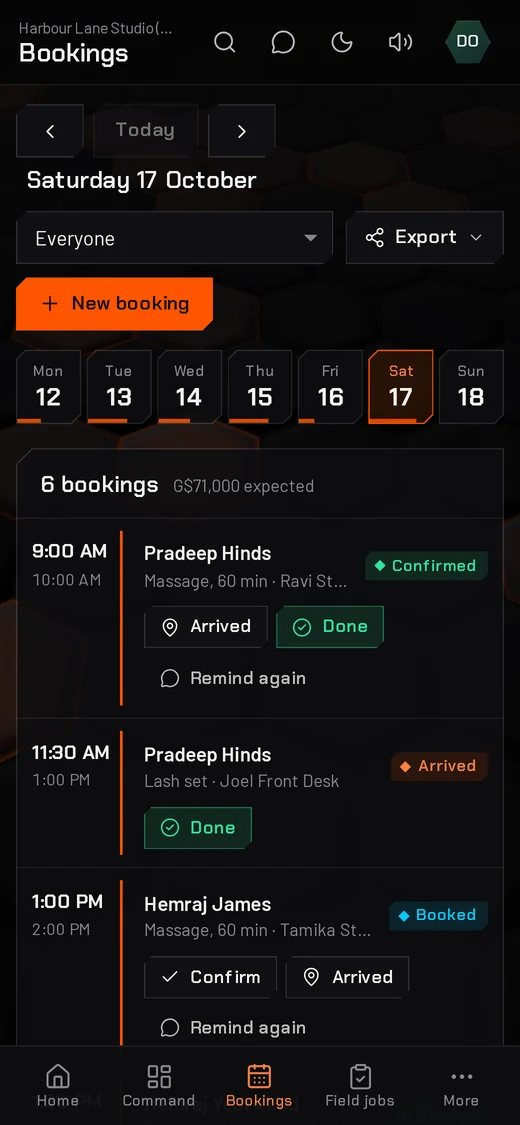
Bookings on the goThe week, the day and who is next. -
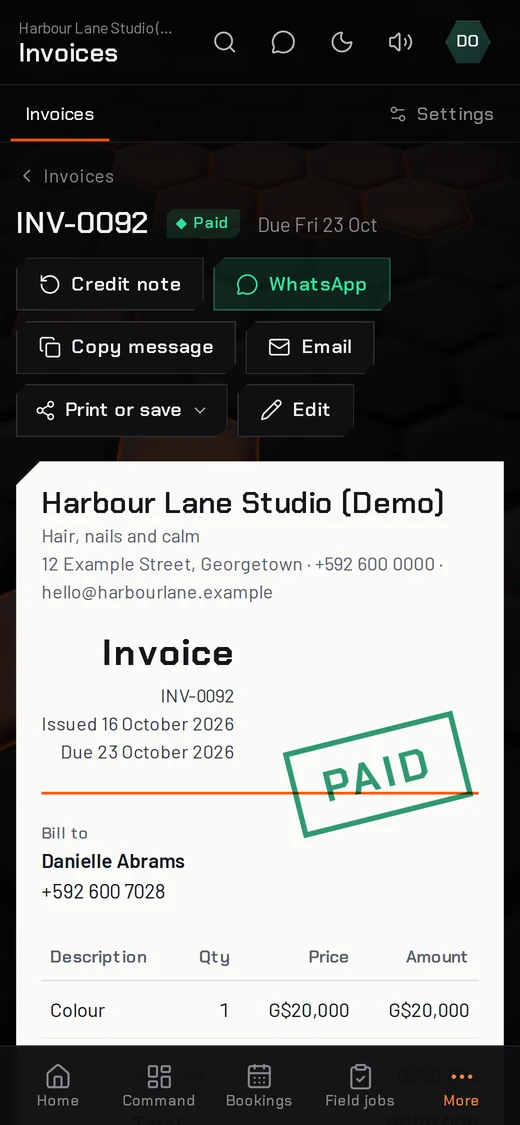
Invoice from anywhereSend it by WhatsApp before you leave.
Safe by design
Your records are the business. HIVE 1.0 treats them that way.
Backed up every minute
A full copy whenever something changes, kept for up to 30 days. Restore any copy from inside HIVE 1.0.
Two-step sign-in
A code from your phone as well as your password. Owners can require it for everyone.
The right access for each person
Owner, manager, staff, accountant and view-only logins.
Kept separate
Every business has its own separate records, never mixed with anyone else's.
Every change written down
An activity log shows who did what and when.
Take it with you
Download a full backup file any time, and export lists to Excel, CSV or PDF.
Every copy, a tap away
See each automatic copy, make one before a big change, and put the business back to any of them. A safety copy of today's data is saved first, so even a restore can be undone.
It also shows when a copy was last saved to a computer, and can remind you on Home every week or month to save a new one.
Simple pricing
One monthly plan. Add the parts you need when you need them.
HIVE 1.0
G$8,000 a month, everything included
Every app and feature is included: no add-ons and no higher plans. Prices are in US dollars; G$ is shown for convenience.
Every plan includes
- Home, the Command centre and your customer list
- Use on any phone, tablet or computer, with nothing to install
- Automatic backups every minute
- Two-step sign-in and staff logins
- Exports to Excel, CSV and PDF
- A built-in help manual and new features as they arrive
Only need bookings, invoices and WhatsApp? HIVE for Small Business is US$25 a month, with a free booking page.
Common questions
Can I try HIVE 1.0 first?
Yes. Open the live demo and sign in with the username demo and the password try-the-hive. It runs a sample salon, every name and figure is fictional, and it goes back to fresh sample data every night.
Do I need to install anything?
No. HIVE 1.0 runs in the browser on a phone, tablet or computer. You can also install it like an app, with its own icon.
Does it handle VAT?
Yes. Each invoice can be standard-rated at 14%, zero-rated, exempt or not VAT-registered. The Taxes screen sets each month's figures out on the lines of GRA's VAT return, with the date it is due.
Can I bring my customer list?
Yes. Import customers from Excel, CSV or your phone's contacts. You see what will be added first, and people already in HIVE 1.0 are not added twice.
Is my data safe?
HIVE 1.0 saves a full copy of your business every minute when something changes and keeps copies for up to 30 days. You can download a full backup at any time, require two-step sign-in, and give each person only the access they need. Every business has its own separate records.
What does it cost?
US$40 (G$8,000) a month, and that is everything: every app and feature is included, with no build fee, no add-ons and no higher plans. Questions? Message us on WhatsApp.
Can my accountant use it?
Yes. An accountant login has full access to the books and view-only access to everything else, and the year-end pack puts every report for the year into one PDF and Excel file.
What if my business needs something custom?
For events, expos and organisations with their own process, we build custom panels around your forms and fees, with no build fee and US$40 a month.
Step inside HIVE 1.0
The demo is live now with a sample salon. Click around, then message us when you are ready.
The demo login is already filled in: press Sign in. (Username demo, password try-the-hive.) Back to fresh sample data every night.